Rep
A theme for activewear, gymwear, yoga, pilates and running brands. It’s a bright training studio at 6 am: a white floor, one loud color block per screen, products standing on running‑track lanes, and a pill for everything shoppers tap. It answers the questions activewear shoppers actually ask: what is this for (shop by activity, with sports bras by support level), how does it feel (a fabric and fit card with a compression meter), does it match (change the color once and the whole set follows), and what size am I (a fit finder that remembers the answer on every product).
One theme, four color palettes.
Pick one in Theme settings › Colors. Change any single color to make an exception.
Switch at any time
The palettes are one setting, not separate installs. Two are light and two are dark, and each sets every storefront color at once. You can override colors one at a time.
Checked for contrast
Every text, control and focus color in the four palettes is measured against WCAG AA contrast, 4.5:1 for text and 3:1 for controls, on every ground it can sit on. A color you set yourself is yours to check.
Lanes and pills
Color blocks curve at one corner like the bend of a running track, with two lanes running round it, and everything shoppers tap is a pill. The lanes draw in once and never loop, and you can turn them off.
Three presets, one theme.
Each preset is a complete starting store, with its own home page, palette and fonts. Every section, block and setting is in all three.
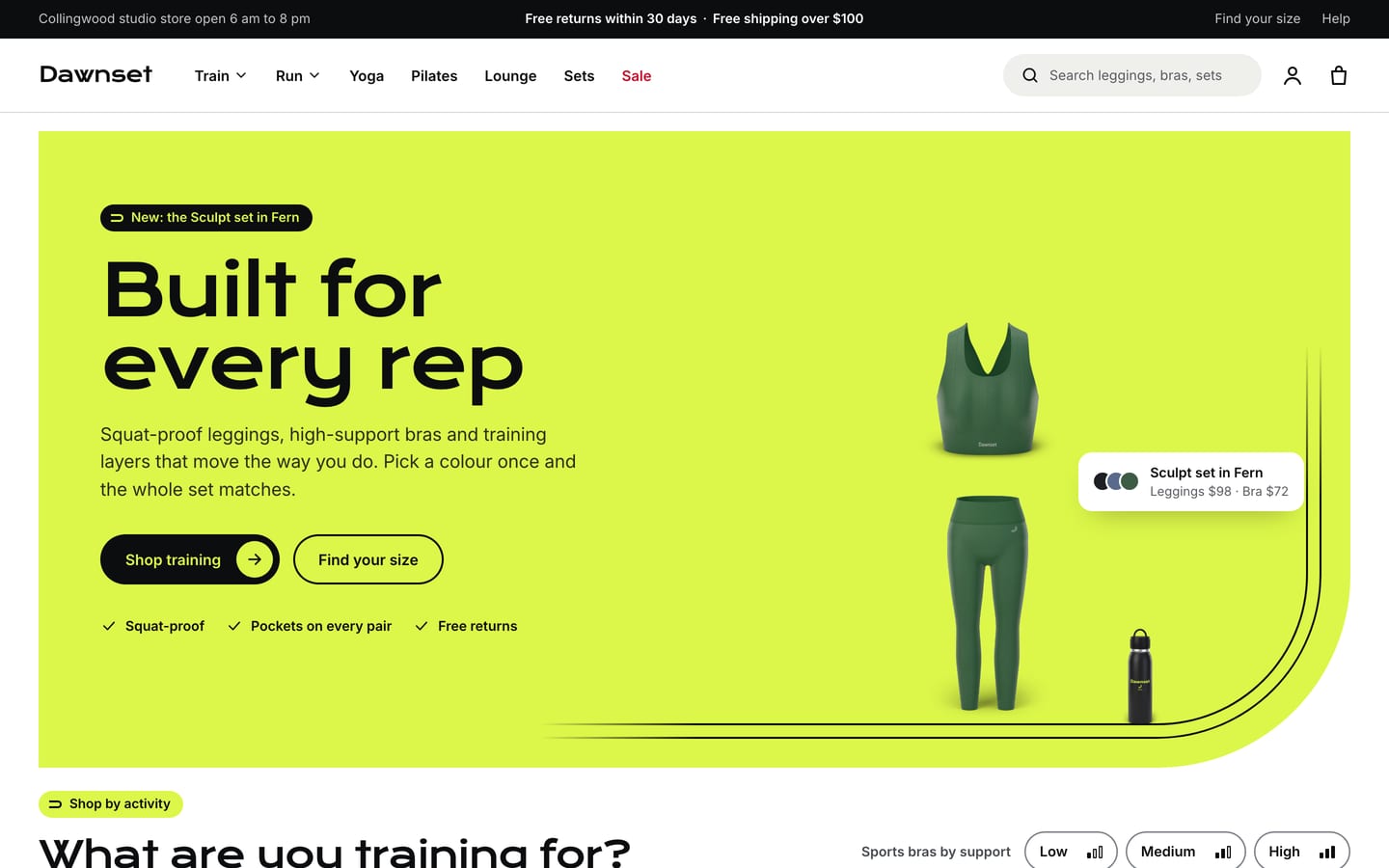
Rep
For gym and training labels, with a lane hero (“Built for every rep”), shop by activity, new drops, the set side by side, a fabric tech row, the fit finder promo, the support finder, testimonials and a newsletter.
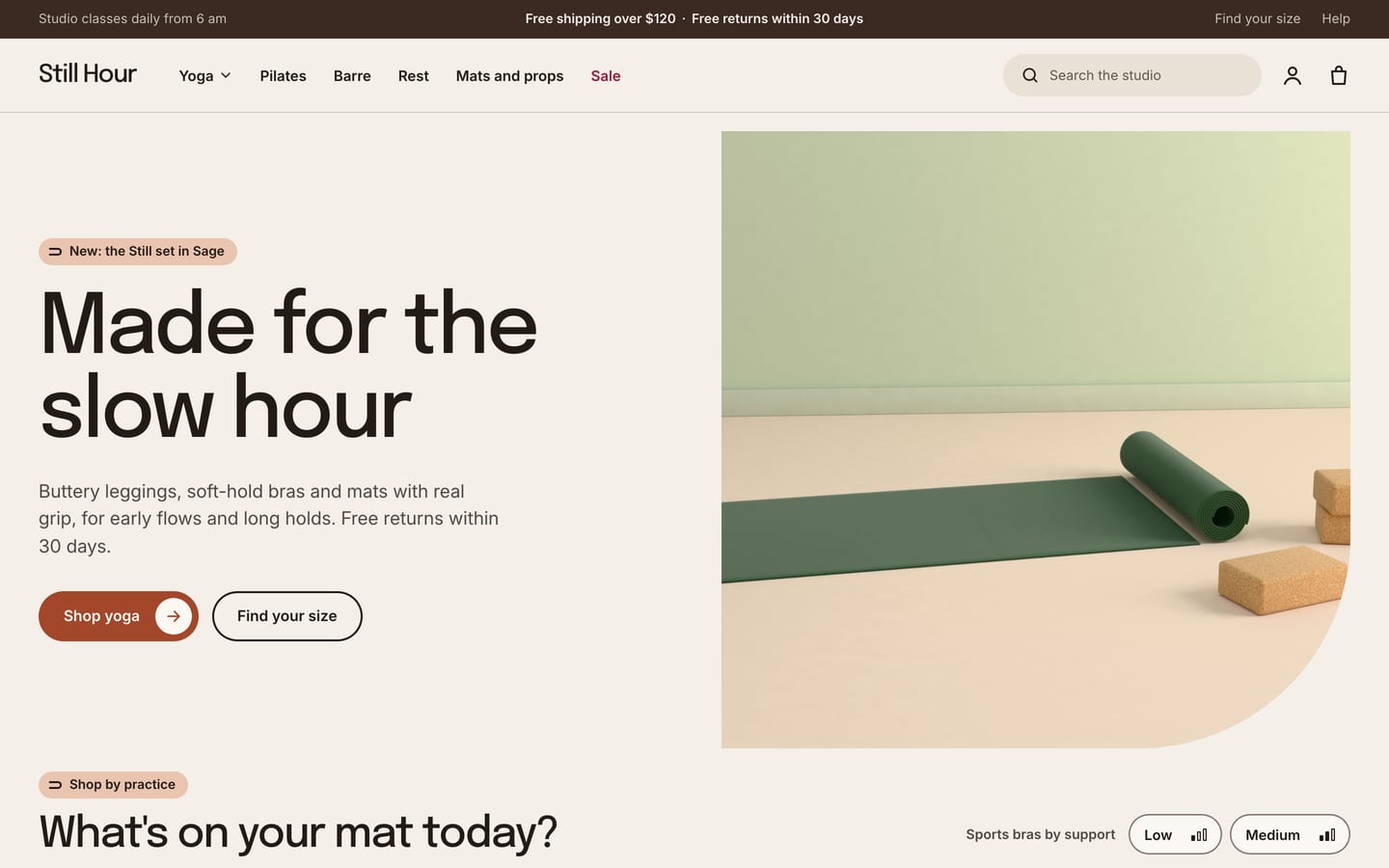
Flow
For yoga and pilates labels and studio shops, with roomier spacing, a split hero (“Made for the slow hour”), shop by practice, new in, the set, a fabric tech row, image with text for mats, the fit finder promo, testimonials and a newsletter.
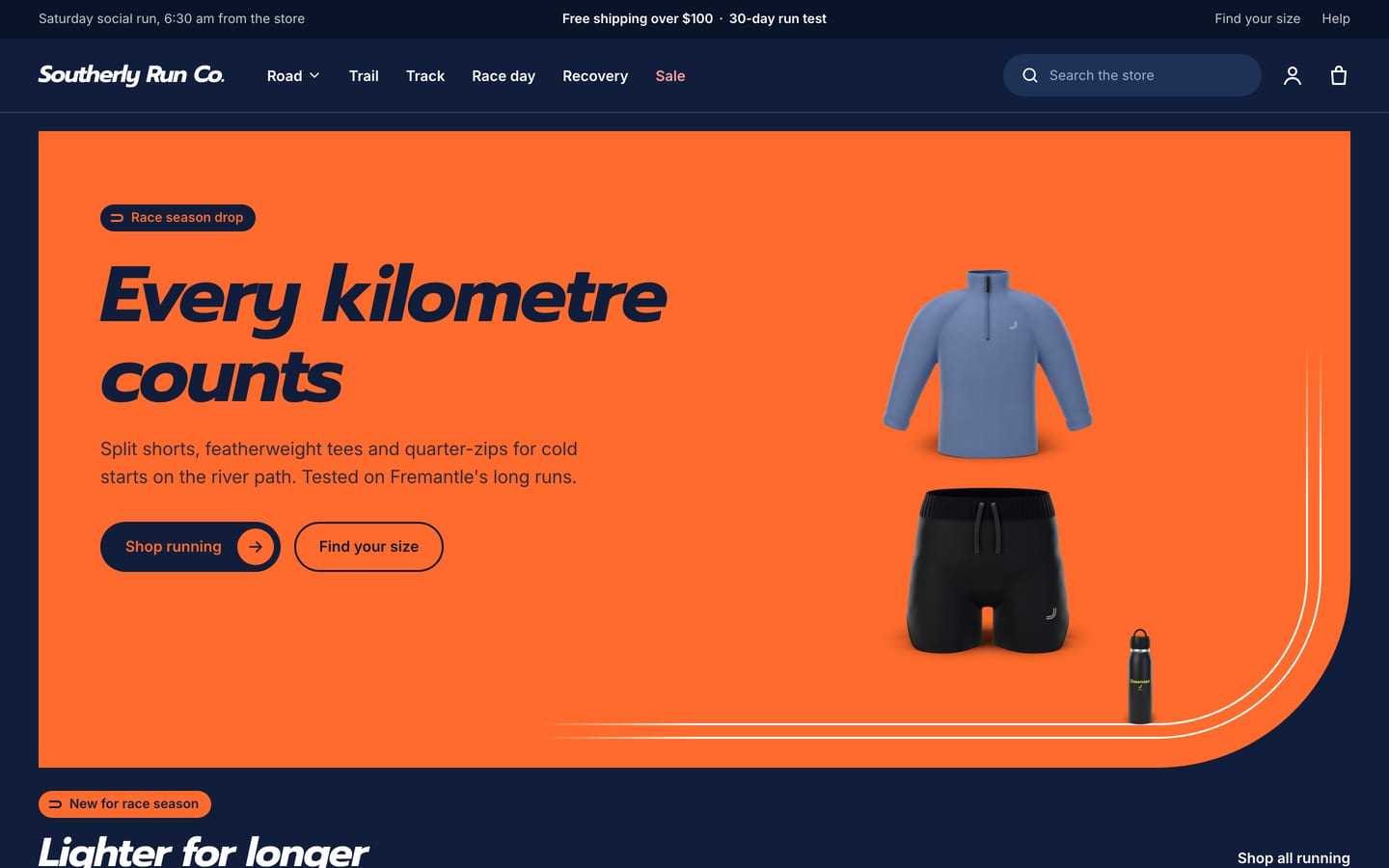
Pace
For running labels and run club stores, with a signal‑orange hero (“Every kilometre counts”), new for race season, shop by run type (Road, Trail, Track, Race day, Recovery), the fit finder promo, a fabric tech row, the support finder, the race kit set, testimonials and a newsletter.
The questions activewear shoppers actually ask.
All four are built in, with no apps. They read ten metafields you create once in Shopify’s settings, options named Colour (or Color), Size and, for leggings in two lengths, Inseam, and your settings in the theme editor. Some steps stay yours: the activity and support links filter once you add those two filters in Shopify’s free Search & Discovery app, and a set discount reaches shoppers only if you create the matching automatic discount in Shopify.
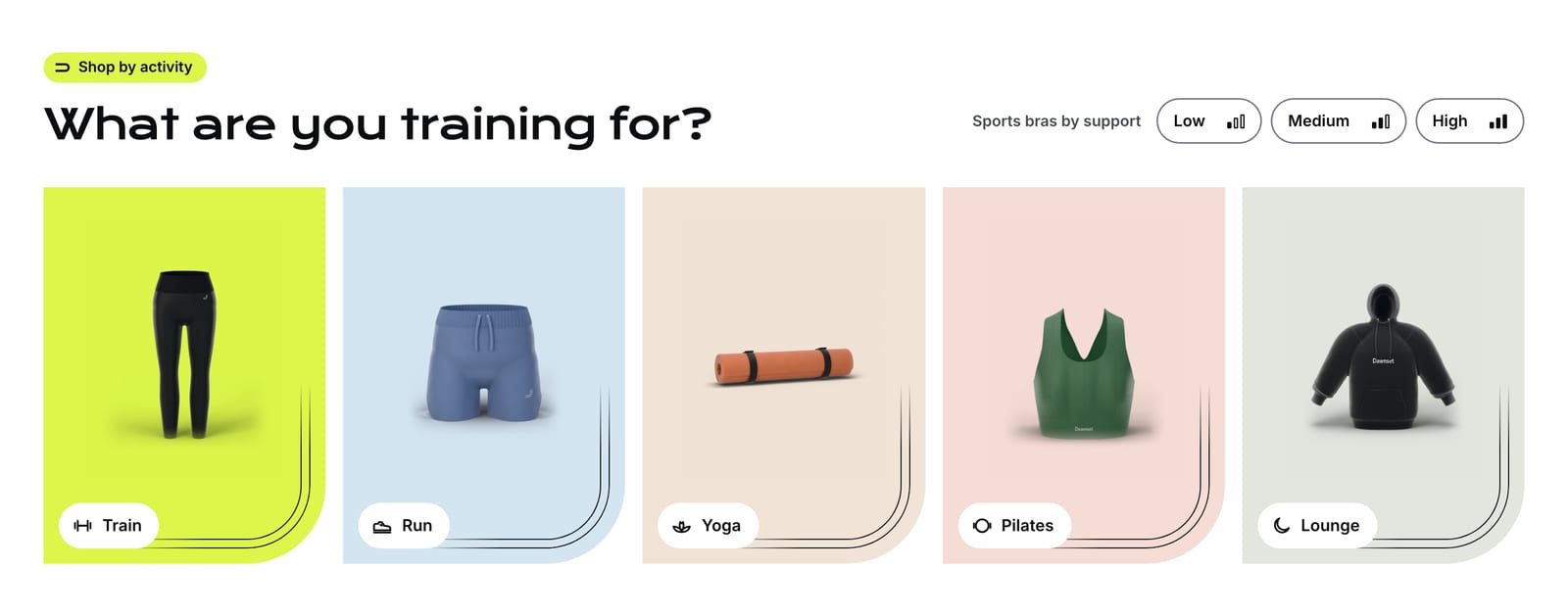
Shop by activity
A home page row of tall tiles (Train, Run, Yoga, Pilates, Lounge, or your own names) with pictograms, plus sports bra chips for Low, Medium and High support with a three‑bar meter. Product cards show up to three activity icons and a support pill, the product page shows activity pills over the title, and collection and search pages get a row of activity pills. A Support finder section explains each support level with its own card. Activities and support levels come from two product metafields. The tile, chip and pill links filter by activity or support level once you add those two filters in Shopify’s free Search & Discovery app; without them, the links open the whole collection, or you can give each tile its own link.
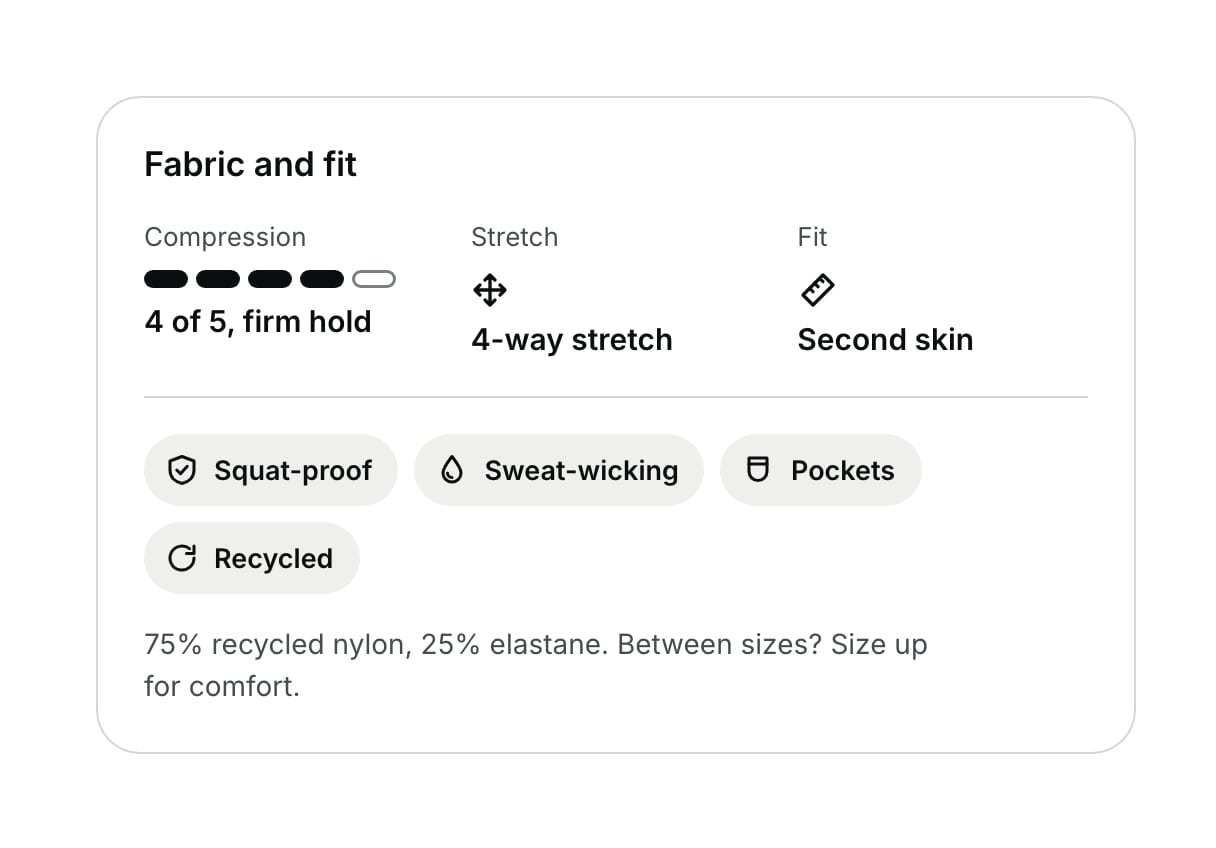
Fabric and fit tech
A Fabric and fit card on the product page with a compression meter (“4 of 5, firm hold”), the stretch, the fit type, fabric feature chips with icons (Squat‑proof, Sweat‑wicking, Pockets, UPF 50+, Recycled and more), the composition, and “Between sizes? Size up for comfort.” on firm styles. Leggings sold in two lengths get an inseam control right under the size pills (“25 in, 7/8 length”); shorts in one length say “Inseam: 4 in”, and the cart line carries it too (“Fern · M · 25 in”). Each row shows only when its metafield is filled in.
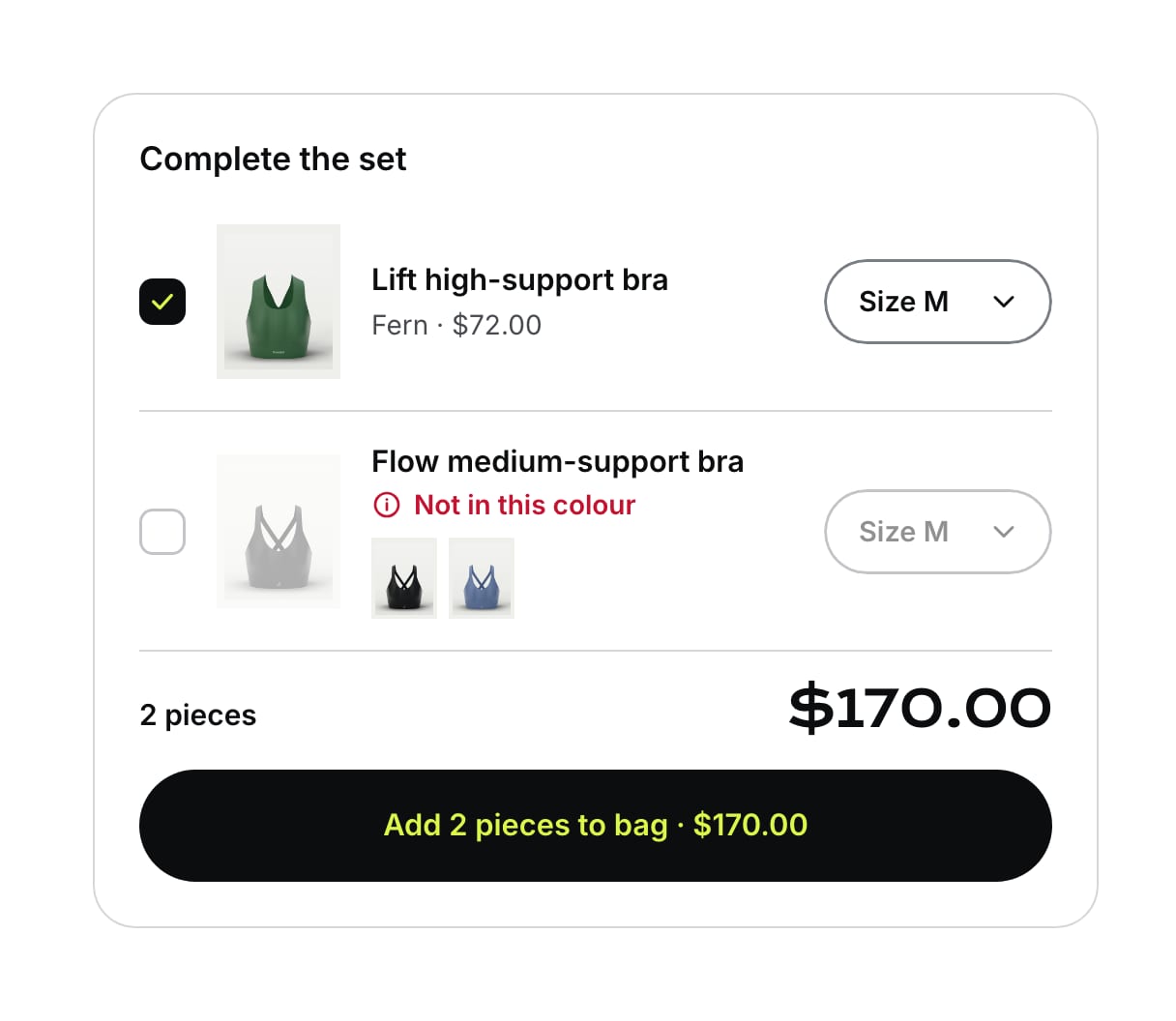
Complete the set
Under the buy buttons, the matching pieces, each shown in the shopper’s color with its price, a size select and a tick box. Change the color once and every piece follows; a piece not made in that color says “Not in this colour” and offers the colors it does come in. A live total and one button, “Add 2 pieces to bag · $170”, add the whole set in one go (or nothing, with a note, if a piece has just sold out), and the lines wear a Set pill in the bag. You choose the pieces per product in a metafield. A set discount is optional: the theme shows an estimated saving only when you set one, and the saving reaches shoppers only if you create the matching automatic discount in Shopify, which applies it at checkout.
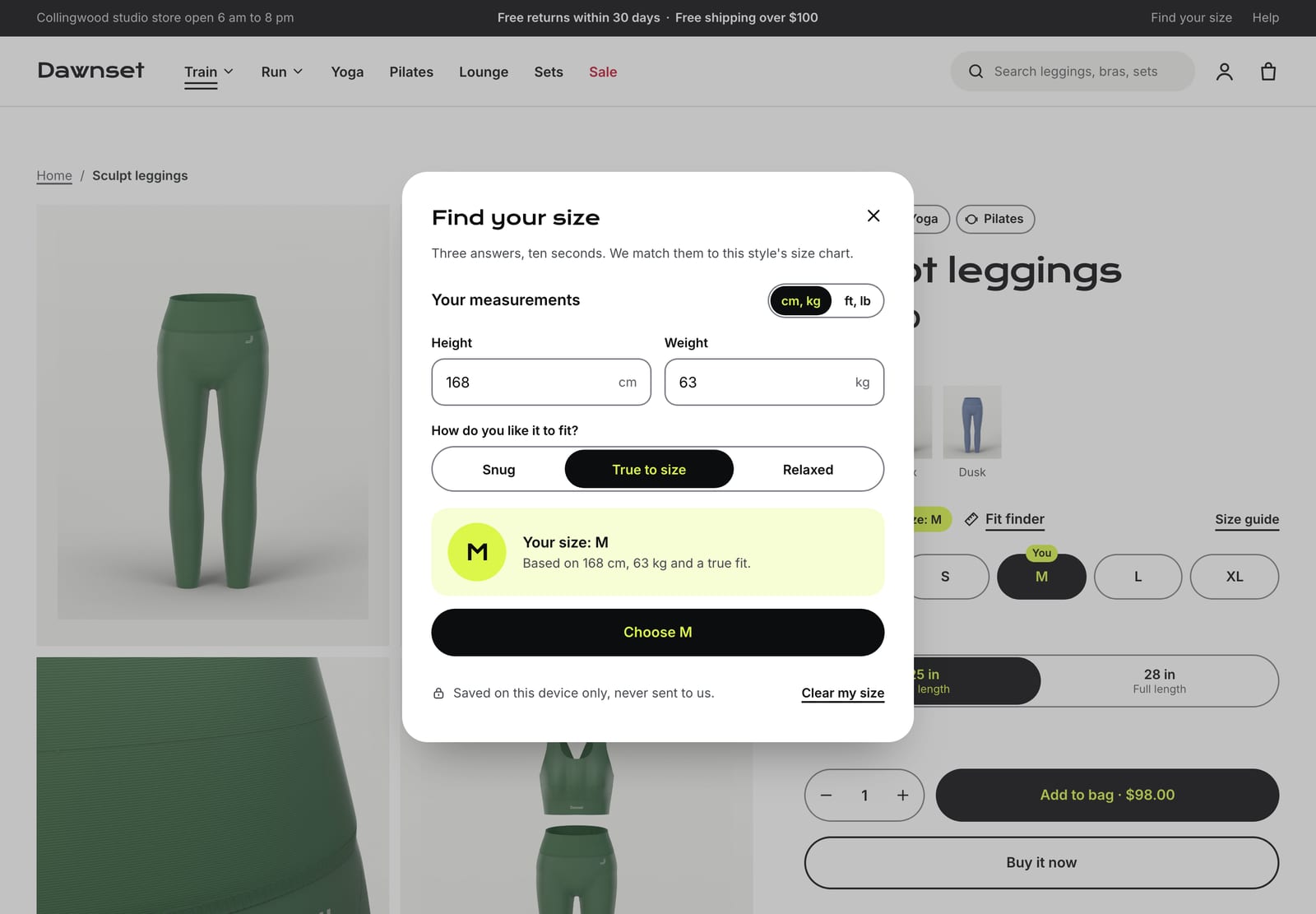
Fit finder
Height (cm, or feet and inches), weight (kg or lb) and Snug, True to size or Relaxed give a size from your size chart, with notes when a shopper falls between sizes or a style runs firm. The answer is saved on the shopper’s own device, never sent to you or anyone else, so every product they open after that says “Your size: M”, marks that size with a You tab and can preselect it. Each product can have its own size chart in a metafield. It recommends from the chart you enter; it’s a guide, not a guarantee of fit. A Fit finder promo section runs the same form on the home page.
What’s in the theme.
Everything below ships in version 1.0.0, and the documentation covers every section and setting.
Pages and sections
- An announcement bar with up to four messages (one can be a countdown to a real deadline), plus your opening hours and two links at the sides
- A one‑row header with a text logo in the heading font or your own logo, a mega menu with promo tiles, a pill search with live suggestions, a More item when the menu doesn’t fit, and three sticky options; the phone menu opens with activity pills
- Hero (lane, split, image or minimal), shop by activity, support finder, collections, featured collection, featured product with the set layout, fit finder promo, image with text, slideshow, icon row, rich text, testimonials, newsletter, bundles, Shop the look with hotspots, As worn at logos, blog posts, FAQ and more
- Page templates for a contact page with an order number field and side‑by‑side product comparison
Product page
- Two product templates: one for anything sold in colors and sizes (the fit finder, the Fabric and fit card and Complete the set) and one for mats, bottles, bags and other accessories
- A two‑column gallery with zoom, and image swatches for each color
- Size pills with “Your size: M”, the inseam control, a sticky add‑to‑bag bar and a trust row
- An optional How it fits size chart that marks the shopper’s row
- Pickup availability and back‑in‑stock requests that reach you by email
- Pre‑orders, gift card recipients, and subscriptions with a subscriptions app
- Shopify’s installments message, on stores with Shop Pay Installments
Collections and search
- Product cards with your photo on studio grey, the support pill, activity icons and color dots that swap the image
- One pill badge per card: Sold out, Sale, Only 3 left, New or your own word from a product tag
- The back on hover, a quick add tray with size pills, quick view and side‑by‑side compare of up to three
- Filters in a sidebar, or a drawer on phones, updating without reloading the page: activity chips with pictograms, support chips with the meter, size pills, color dots and price fields
- Search with live suggestions: products, collections, pages and articles
Cart
- Cart drawer and cart page with a free shipping meter and an order note
- Set pills on the lines of a set
- The inseam on each line
Trade and B2B
- Quantity rules, volume pricing and a quick order list for wholesale customers on Shopify’s B2B features
Accessibility and languages
- Every text, control and focus color measured against WCAG AA contrast in every palette
- Keyboard friendly
- Motion: lanes draw in once, images lift a little on hover and the quick add tray slides up; nothing loops, and motion stops for shoppers who prefer reduced motion
- Right‑to‑left languages
At a glance.
- Version
- 1.0.0, an instant download from Etsy
- In the download
- Three theme files, one per preset (Rep, Flow and Pace), a user guide (PDF, 56 pages) and a license for one store
- Built on
- Online Store 2.0
- Color palettes
- Four in one theme: Volt, Clay, Track and Graphite (two light, two dark)
- Fonts
- Krona One, Epilogue or Prompt Bold Italic for headings, depending on the preset, and Inter for body text in all three. Font pickers for headings and body text, heading and text sizes, page width and margins, section spacing, lanes on or off and a back‑to‑top button.
- You’ll need
- A Shopify store on any plan that can publish a theme, and a computer to upload it (phones can’t upload theme files). Collection filters, the activity and support level links, Shop in size M and complementary product recommendations need Shopify’s free Search & Discovery app. Subscriptions need a subscription app that creates selling plans, such as Shopify’s free Shopify Subscriptions. The installments message under the price needs Shop Pay Installments switched on, where Shopify offers it. Star ratings need a reviews app, other languages Shopify’s free Translate & Adapt app, and wholesale customers Shopify B2B, on plans that include it.
- Your data
- Rep reads options by name: name them Colour (or Color), Size and, for leggings in two lengths, Inseam, and use the same color names on pieces that match (“Fern” on the bra and the leggings) and the same size names everywhere (XS to XL by default; “M” isn’t “Medium”). Activities, support levels, the fabric card, sets and per‑product size charts read ten metafields you create once in Shopify’s settings, with no app: custom.activities, custom.support_level, custom.compression, custom.stretch, custom.fit_type, custom.fabric_features, custom.composition, custom.set_with and custom.size_matrix on products, and custom.inseam on variants. The user guide gives every exact key, type and format, step by step. The fit finder keeps each shopper’s answers in their own browser, so you can’t see your customers’ sizes, and a shopper enters them again on another device. Rep doesn’t create discounts: Complete the set’s saving is an estimate, shown only when you set a set discount, and it reaches shoppers only if you create the matching automatic discount in Shopify. Until you choose images, the hero, activity tiles, support cards and testimonials draw simple sample garments, on your live store too. The presets’ words are demo text, including claims about free shipping, free returns and size swaps, opening hours, a newsletter perk and sample testimonials, so use real reviews and only promise what your store actually offers.
- Support
- Message us on Etsy or email hello@buglyph.com. We reply within two business days, Monday to Friday, Australian Eastern Time.
Documentation and support.
Documentation
Installing the theme, every section and setting, and setting up Rep’s data, chapter by chapter. The same guide comes as a PDF in the download.
Support
Questions, bugs and setup help. Message us on Etsy or email us. We reply within two business days, Monday to Friday, Australian Eastern Time.
Rep
Sold on Etsy as an instant download. Each purchase licenses one Shopify store.