Dose
A theme for vitamin and gummy brands, herbal and adaptogen brands and sports nutrition. It’s a bright pharmacy shelf with a daily rhythm: a warm white page, one confident color stage where the products stand on a real shelf, a soft goal color under every product, and small round dose dots that count gummies a day and days in a bottle. It answers the questions supplement shoppers ask before they buy: what’s in it, and how much (a real supplement facts panel), where do I start (a goal finder that builds a starter stack), how long will it last (a supply calculator that sets the delivery to match), and what’s the evidence (ingredients, certifications and the lab report).
One theme, four color palettes.
Pick one in Theme settings › Colors. Change any single color to make an exception.
Switch at any time
The palettes are one setting, not separate installs. Three are light and one is dark, and each sets every storefront color at once, the six goal colors included. You can override colors one at a time.
Checked for contrast
Every text, control, dot and focus color in the four palettes is measured against WCAG AA contrast, 4.5:1 for text and 3:1 for controls, on every ground it can sit on, goal colors and the facts label included. A color you set yourself is yours to check.
Dose dots and goal colors
Small round dots count what supplement shoppers count: gummies a day, days in a bottle, questions left in the quiz. Six soft goal colors (lilac, apricot, sky, lemon, mint and pink) sit under products, so a range reads like a routine. Every corner is a rounded square; the only circles are the dots.
Three presets, one theme.
Each preset is a complete starting store, with its own home page, palette and fonts. Every section, block and setting is in all three.
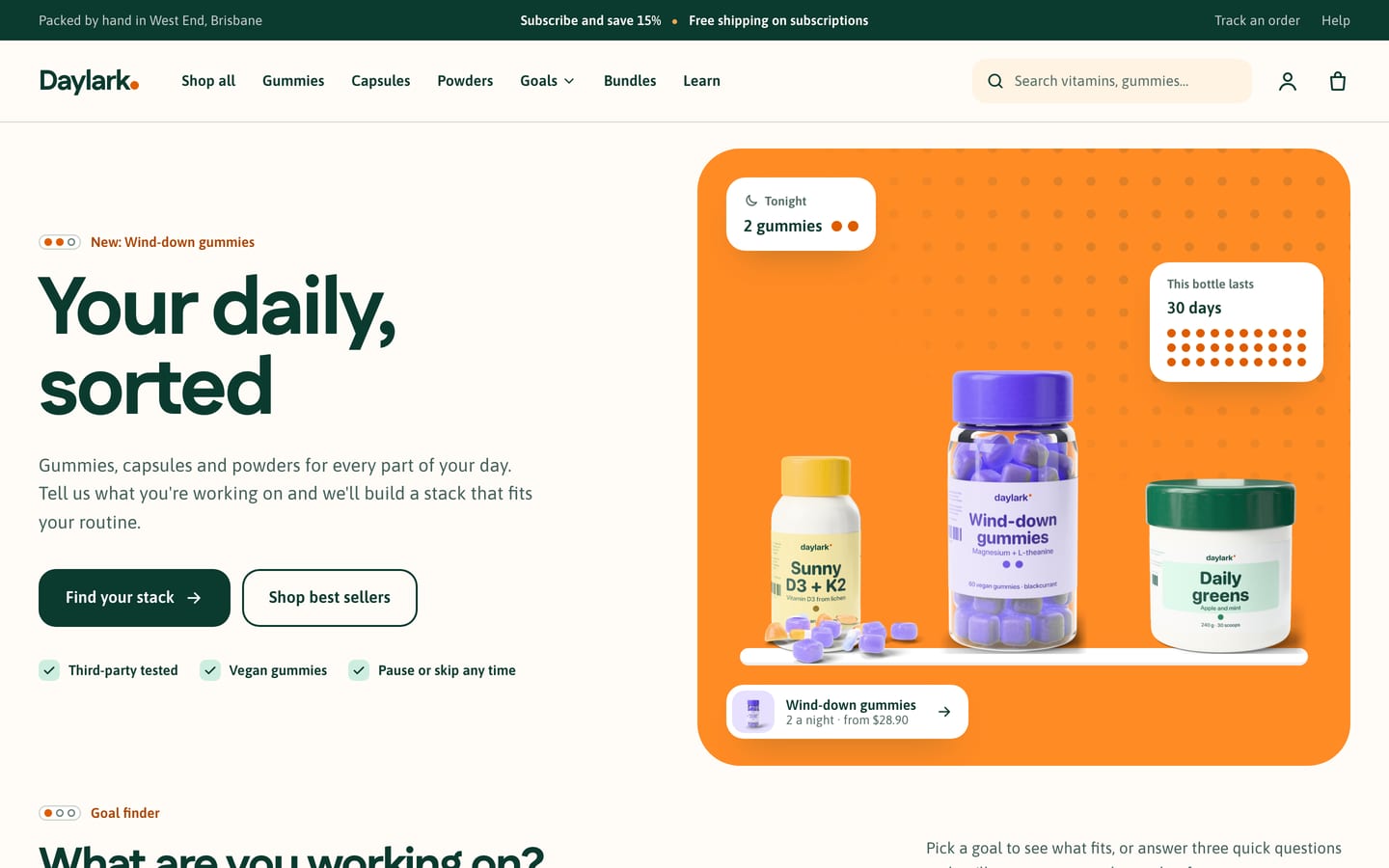
Dose
For vitamin and gummy brands, with a shelf hero (“Your daily, sorted”), the goal finder, best sellers with goal chips, a fact row, the supply promo (“Never run out”), an ingredient spotlight, testimonials, an FAQ and a newsletter.
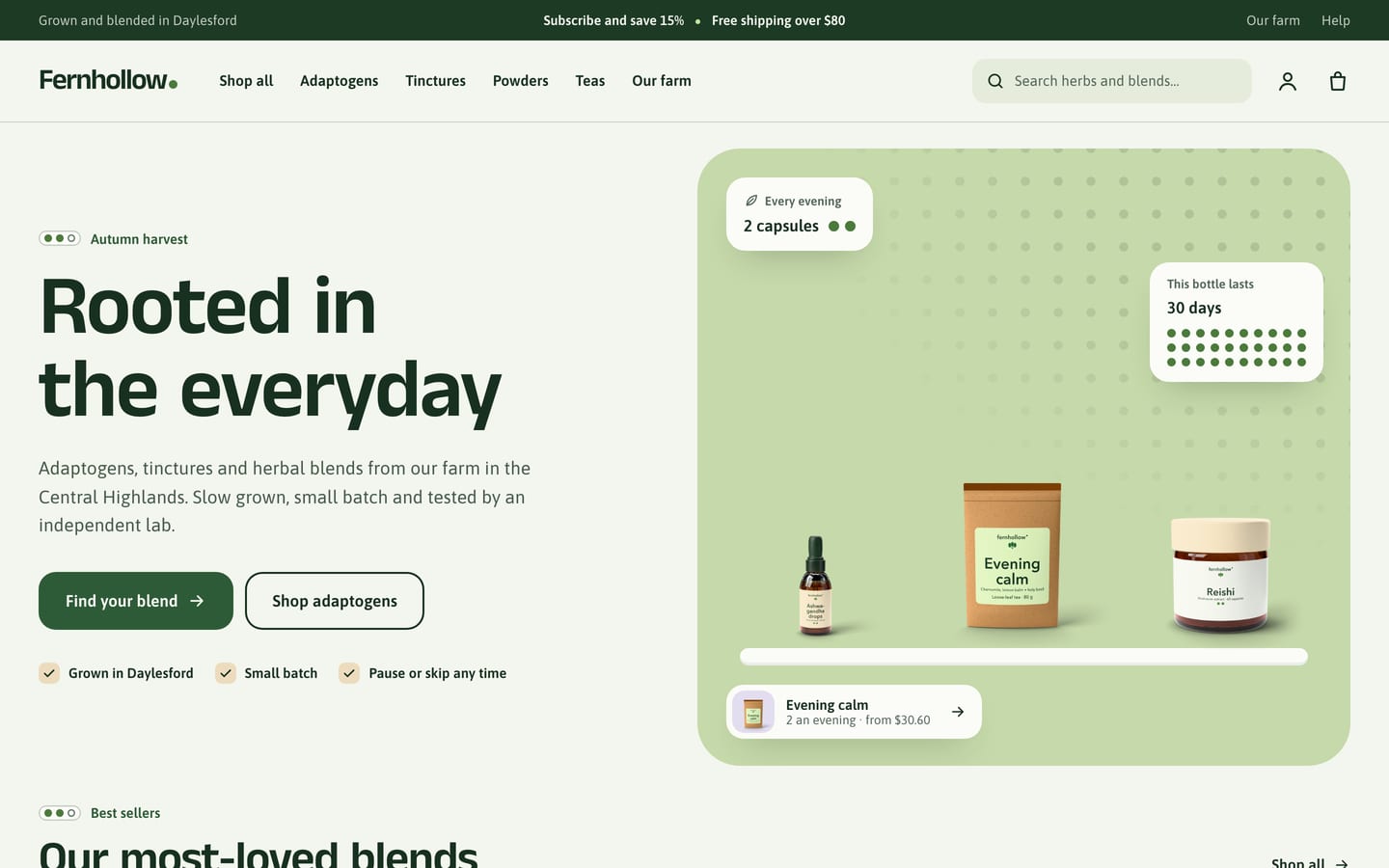
Botanic
For herbal and adaptogen brands, with roomier spacing, a shelf hero (“Rooted in the everyday”), best sellers, the goal finder, image with text for the farm, an ingredient spotlight, the supply promo, a fact row, testimonials and a newsletter.
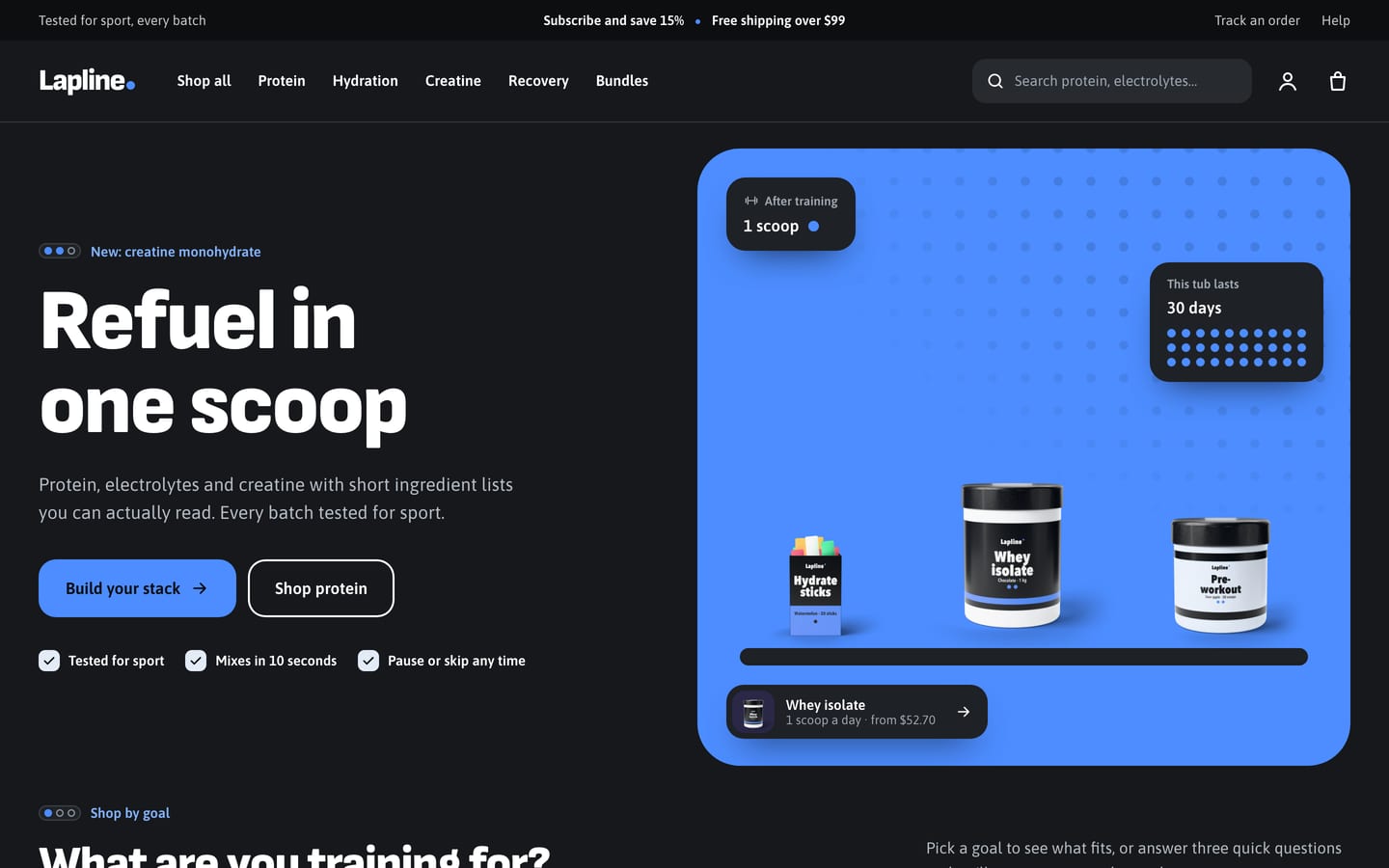
Fuel
For sports nutrition, with an electric‑blue shelf hero (“Refuel in one scoop”), the goal finder set to training goals, best sellers, the supply promo (“Never run out mid‑block”), a fact row, starter stacks, an ingredient spotlight, testimonials and a newsletter.
What’s in it, where to start, how long it lasts.
All four are built in, with no apps. They read ten product metafields you create once in Shopify’s settings and your settings in the theme editor; there are no metaobjects to set up. Some steps stay yours: delivery plans come from a subscription app, such as Shopify’s free Shopify Subscriptions, and the goal links filter once you add the Goal filter in Shopify’s free Search & Discovery app. Dose prints the facts and claims you enter and doesn’t check them.
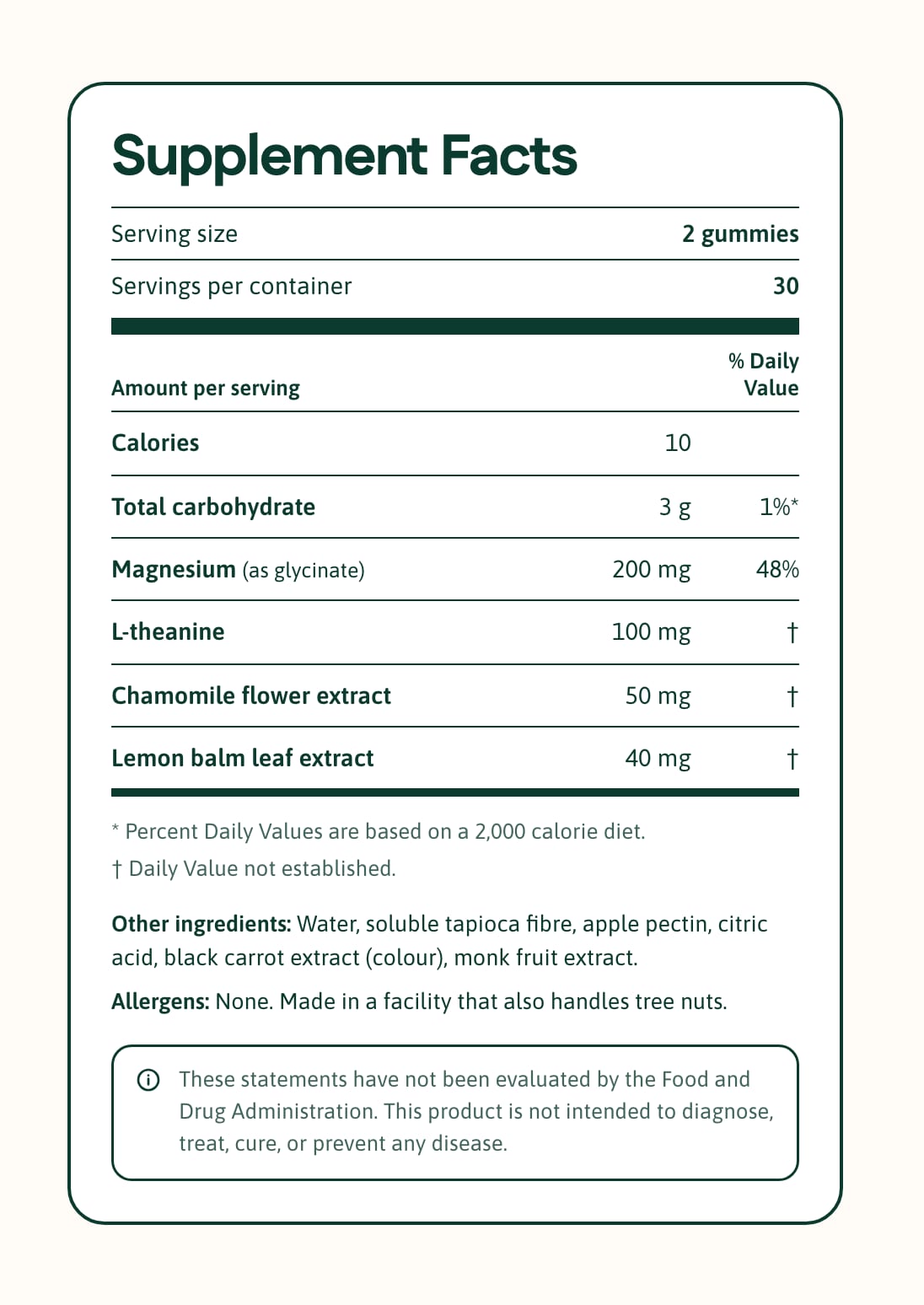
Supplement facts panel
A real facts label on every product page, built from one plain text field, one line per row: serving size, servings per container, each nutrient with its amount and % daily value, sub‑headings and indented rows for blends, other ingredients, allergens and a disclaimer in a ruled box. The footnotes show only when a row needs them. The heading can read Supplement Facts, Nutrition Information or your own, and the footnotes and disclaimer are settings, so the label can use the wording your country requires. It’s a real table that screen readers can follow, and on the smallest phones it scrolls inside its frame instead of squeezing. On the dark palette the label stays light.
Goal finder
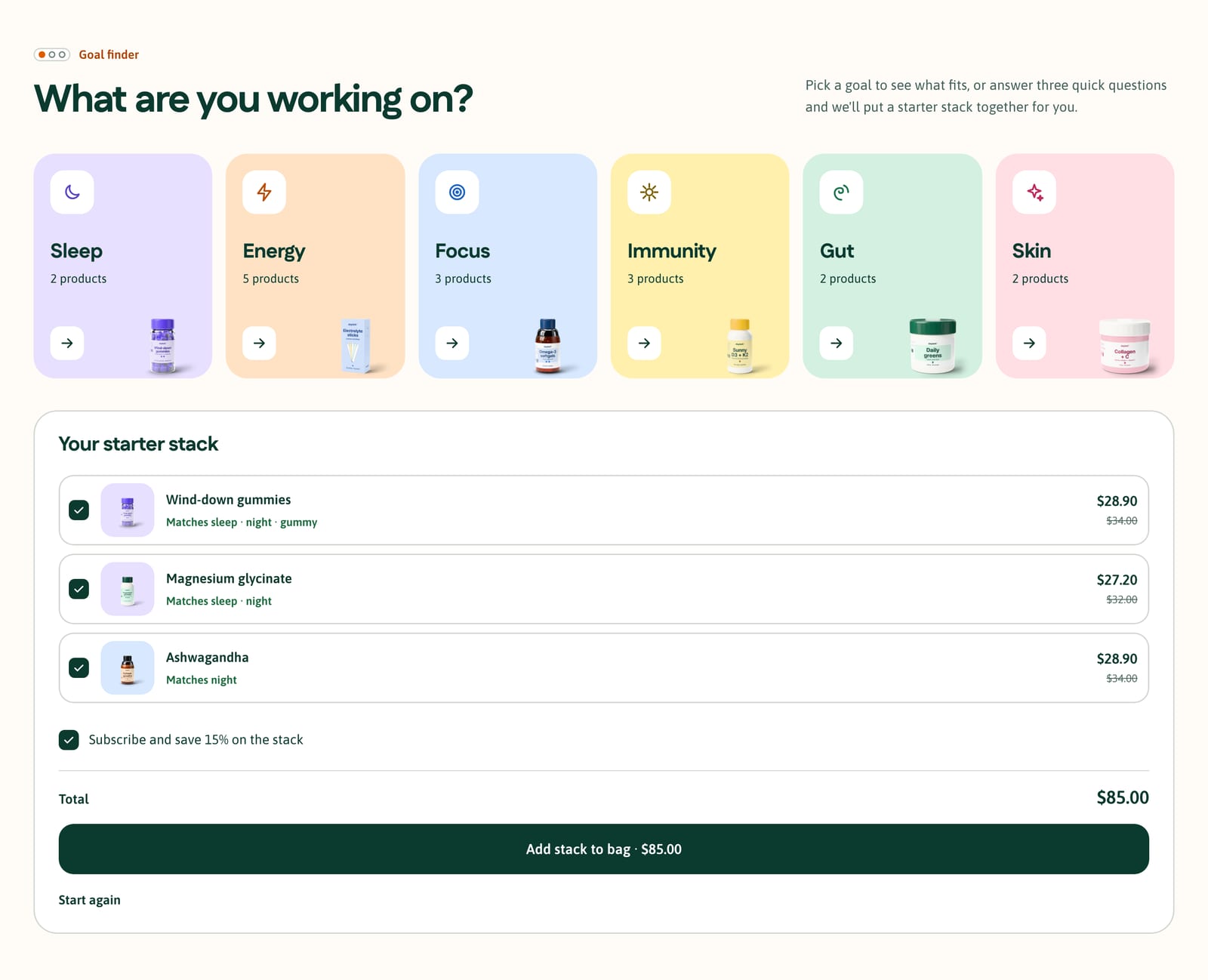
Six goal tiles (Sleep, Energy, Focus, Immunity, Gut and Skin, or your own names), each in its own soft color with an icon and a product count, open the products for that goal. Under them, a three‑question quiz (the main goal, morning or night, and gummy, capsule or powder) ranks the products of a collection you choose and builds a starter stack of up to three, each with a line saying why it was picked and a tick box, then the total and an option to subscribe to the whole stack. One button adds the stack to the bag in one go, or nothing, with a note, if a product has just sold out. The quiz runs in the shopper’s browser from two metafields, goals and format, and asks for no email. The tiles filter by goal once you add the Goal filter in Search & Discovery; until then they open a collection you choose.
Supply calculator
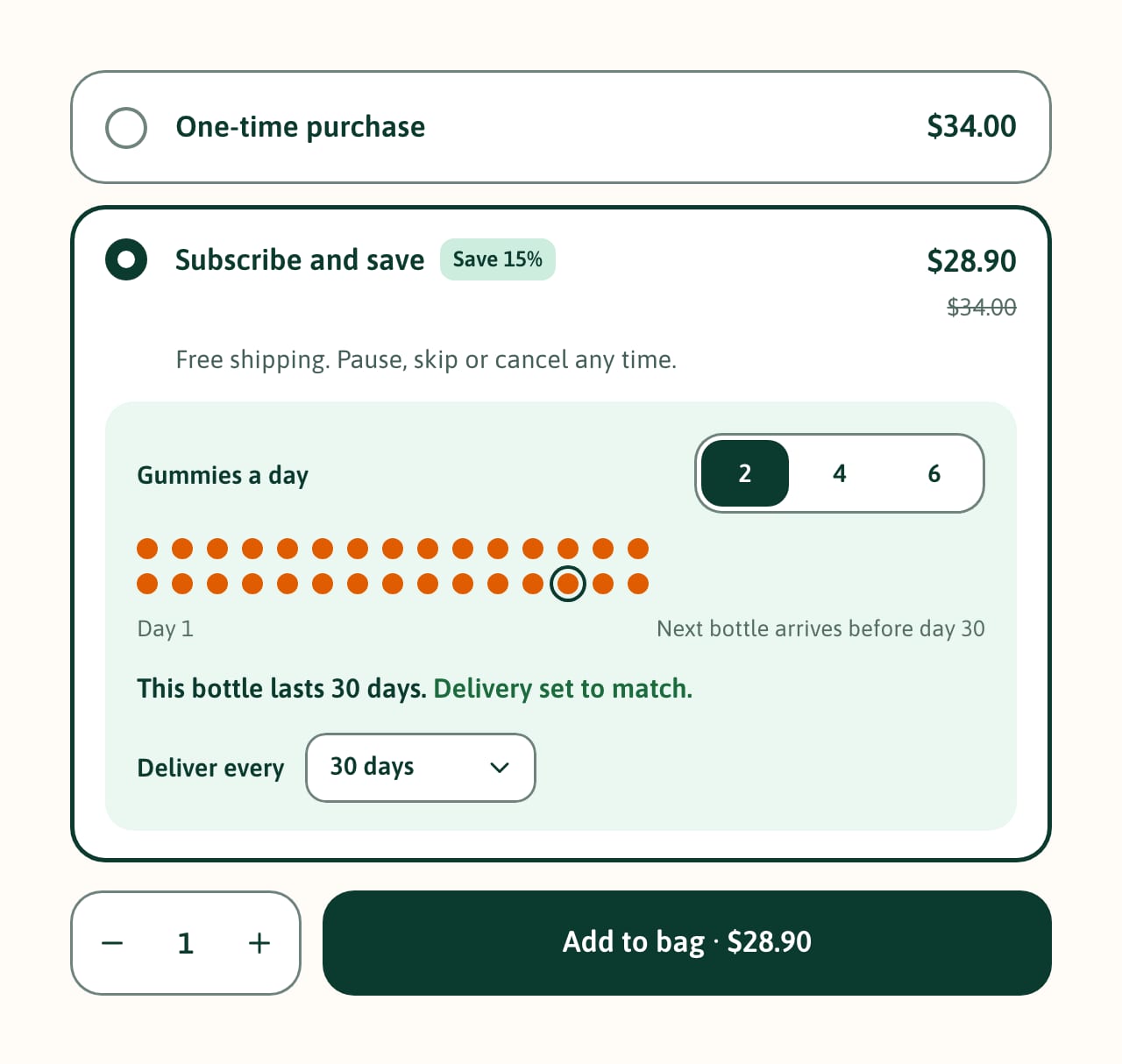
Inside Subscribe and save on the product page: “Gummies a day” (or capsules, scoops or servings, from the serving size) with choices such as 2, 4 or 6, a calendar of dots with one dot a day and the delivery day ringed, “This bottle lasts 30 days. Delivery set to match.” and the delivery plan that brings the next bottle before the last runs out, already chosen. Take more a day and it says “One bottle lasts 15 days” and offers Use 2 bottles to match the delivery. It reads each plan’s length from its name (“Deliver every 30 days”, “Every 4 weeks”), never changes a plan the shopper picked, and without delivery plans it shows how long the bottle lasts. A Never run out home section shows the same calculator for one product beside the sum “60 gummies ÷ 2 a day = 30 days”.
Ingredients and evidence
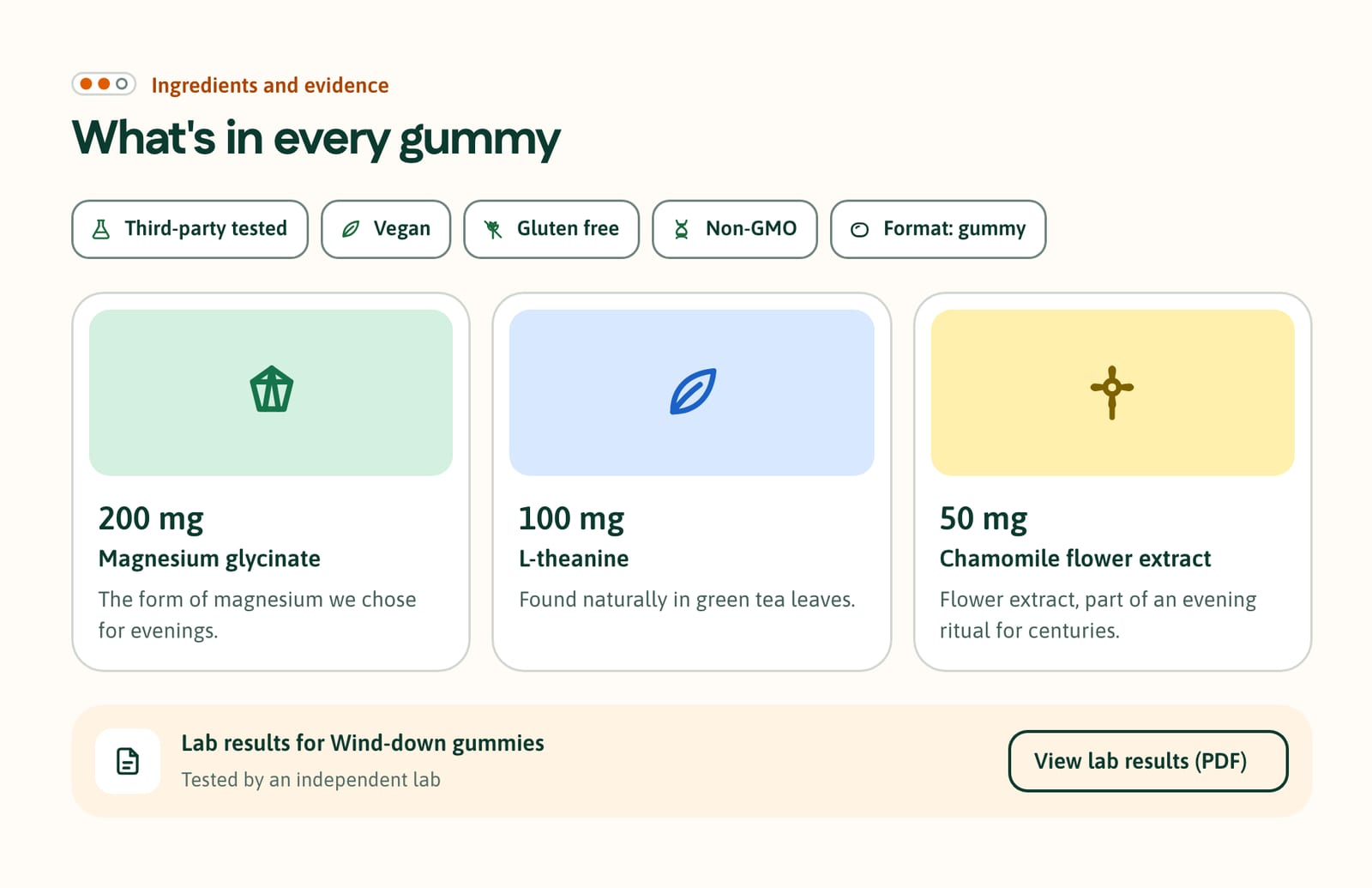
Beside the facts panel, “What’s in every gummy”: certification chips with plain icons and words (Third‑party tested, Vegan, Gluten free, Non‑GMO or your own, never a certifier’s logo), the format chip, ingredient cards with the amount large, the name and your note, each on a goal color with an icon, and a lab row whose View lab results (PDF) button opens the report you upload or link, in a new tab. A home page Ingredient spotlight shows four ingredients with photos, amounts and links to their products, over an evidence row. Each part shows only when its metafield is filled in.
What’s in the theme.
Everything below ships in version 1.0.0, and the documentation covers every section and setting.
Pages and sections
- An announcement bar with up to four messages taking turns (one can be a countdown to a real deadline), plus a line of your own and two links at the sides
- A one‑row header with your shop name in the heading font and its dose dot, or your own logo, a mega menu with goal tiles and promo tiles, a search field, a More item when the menu doesn’t fit, and three sticky options; the phone menu opens with Shop by goal tiles
- Hero (shelf, split, image or minimal), goal finder, featured collection with goal chips, featured product, fact row, supply promo, ingredient spotlight, image with text, slideshow, testimonials, starter stacks, Shop the shelf with hotspots, As seen in logos, blog posts, newsletter, FAQ and more
- Page templates for a contact page with an order number field and side‑by‑side product comparison
Product page
- Two product templates: one for supplements (the supply calculator, the supplement facts panel and ingredients and evidence) and one for pill organisers, shakers and other accessories
- A gallery on the product’s goal color, with zoom, video and 3D models
- One‑time and Subscribe and save options as cards, with the saving worked out from your plan’s real price
- Format and goal tags, a stock line (“Only 4 left”), a sticky add‑to‑bag bar and a trust row
- Pickup availability and back‑in‑stock requests that reach you by email
- Pre‑orders, gift card recipients, and subscriptions with a subscriptions app
- Shopify’s installments message, on stores with Shop Pay Installments
Collections and search
- Product cards with your photo on its goal color, a serving chip (“2 a day · 30 days”), goal tags, the subscription price and a square quick add
- One badge per card: Sold out, Pre‑order, Sale, New, Best seller or your own word from a product tag
- A second image on hover, flavour swatches, quick view and side‑by‑side compare of up to three
- A goal chip row above every collection, and filters in a sidebar, or a drawer on phones: goal chips with their color dots, format chips with icons, certifications and price
- Search with live suggestions: products, collections, pages and articles
Cart
- Cart drawer and cart page with a dotted free shipping meter and an order note
- The delivery plan and a serving line on each line (“2 a day · lasts 30 days”)
- Stack tags on the products the goal finder added together
Trade and B2B
- Quantity rules, volume pricing and a quick order list for wholesale customers on Shopify’s B2B features, such as clinics, pharmacies and gyms reordering stock
Accessibility and languages
- Every text, control, dot and focus color measured against WCAG AA contrast in every palette
- Keyboard friendly, the quiz included
- Motion: the dots fill in once and images lift a little on hover; nothing loops, and motion stops for shoppers who prefer reduced motion
- Right‑to‑left languages
At a glance.
- Version
- 1.0.0, an instant download from Etsy
- In the download
- Three theme files, one per preset (Dose, Botanic and Fuel), a user guide (PDF, 54 pages) and a license for one store
- Built on
- Online Store 2.0
- Color palettes
- Four in one theme: Citrus, Moss, Charge and Berry (three light, one dark)
- Fonts
- Fustat, Anek Tamil or Sofia Sans for headings, depending on the preset, and Asap for body text in all three. Font pickers for headings and body text, heading and text sizes, heading letter spacing, page width, section spacing, the dot grid and dot motion on or off, and a back‑to‑top button.
- You’ll need
- A Shopify store on any plan that can publish a theme, and a computer to upload it (phones can’t upload theme files). Subscriptions, and the delivery plans the supply calculator chooses, need a subscription app that creates selling plans, such as Shopify’s free Shopify Subscriptions; without one, the calculator shows how long a bottle lasts. Collection filters, the goal links and complementary product recommendations need Shopify’s free Search & Discovery app. The installments message under the price needs Shop Pay Installments switched on, where Shopify offers it. Star ratings need a reviews app, other languages Shopify’s free Translate & Adapt app, and wholesale customers Shopify B2B, on plans that include it.
- Your data
- The facts panel, the supply calculator, the goal finder, ingredients and evidence, card colors and serving chips read ten product metafields you create once in Shopify’s settings, with no app and no metaobjects: custom.supplement_facts, custom.servings, custom.daily_servings, custom.other_ingredients, custom.allergens, custom.goals, custom.format, custom.key_ingredients, custom.certifications and custom.lab_report, plus custom.servings on variants for sizes such as 30, 60 and 90 counts. The facts are one plain text field, one line per row. The user guide gives every exact key, type and format, step by step. Dose prints the words and numbers you enter and doesn’t check them, and it gives no health, medical or regulatory advice: the facts panel’s heading, footnotes and disclaimer are settings, so you can use the wording your country requires. Dose shows delivery plans; it doesn’t create them or take repeat payments. Until you choose images, the hero shelf, testimonials and a few other sections draw simple sample bottles, tubs and stick packs, on your live store too. The presets’ words are demo text, including claims about lab testing, vegan and no‑added‑sugar products, free shipping, subscription savings, a money‑back promise, FAQ answers and sample testimonials, so use real reviews and only claim what you can show is true.
- Support
- Message us on Etsy or email hello@buglyph.com. We reply within two business days, Monday to Friday, Australian Eastern Time.
Documentation and support.
Documentation
Installing the theme, every section and setting, and setting up Dose’s data, chapter by chapter. The same guide comes as a PDF in the download.
Support
Questions, bugs and setup help. Message us on Etsy or email us. We reply within two business days, Monday to Friday, Australian Eastern Time.
Dose
Sold on Etsy as an instant download. Each purchase licenses one Shopify store.