Hooray
A theme for party supply shops, balloon artists and event decorators, and grown‑up celebration shops. It’s built for a shopper who arrives with an occasion, an age, a date and a guest count, and it answers each one: shop by occasion and a “Turning…” picker of foil number balloons, a balloon garland builder with a live preview, an event date and delivery zone check in the cart, and a party box worked out from the guest count. It looks like a party: occasion balloons on strings, foil numbers with milestones in gold, curling paper streamers between sections and a balloon garland in your palette’s colors.
One theme, four color palettes.
Pick one in Theme settings › Colors. Change any single color to make an exception.
Switch at any time
The palettes are one setting, not separate installs. Three are light and one is dark, and each sets every storefront color at once. You can override colors one at a time.
Checked for contrast
Every text and control color in the four palettes is measured against WCAG AA contrast, 4.5:1 for text and 3:1 for controls, on every ground it can sit on. A color you set yourself is yours to check.
A garland in your colors
The hero’s balloon garland is drawn in your palette’s colors, so it changes when the palette does. Until you add pictures, the hero and the occasion tiles show plain colored balloons.
Three presets, one theme.
Each preset is a complete starting store, with its own home page, palette and fonts. Every section, block and setting is in all three.
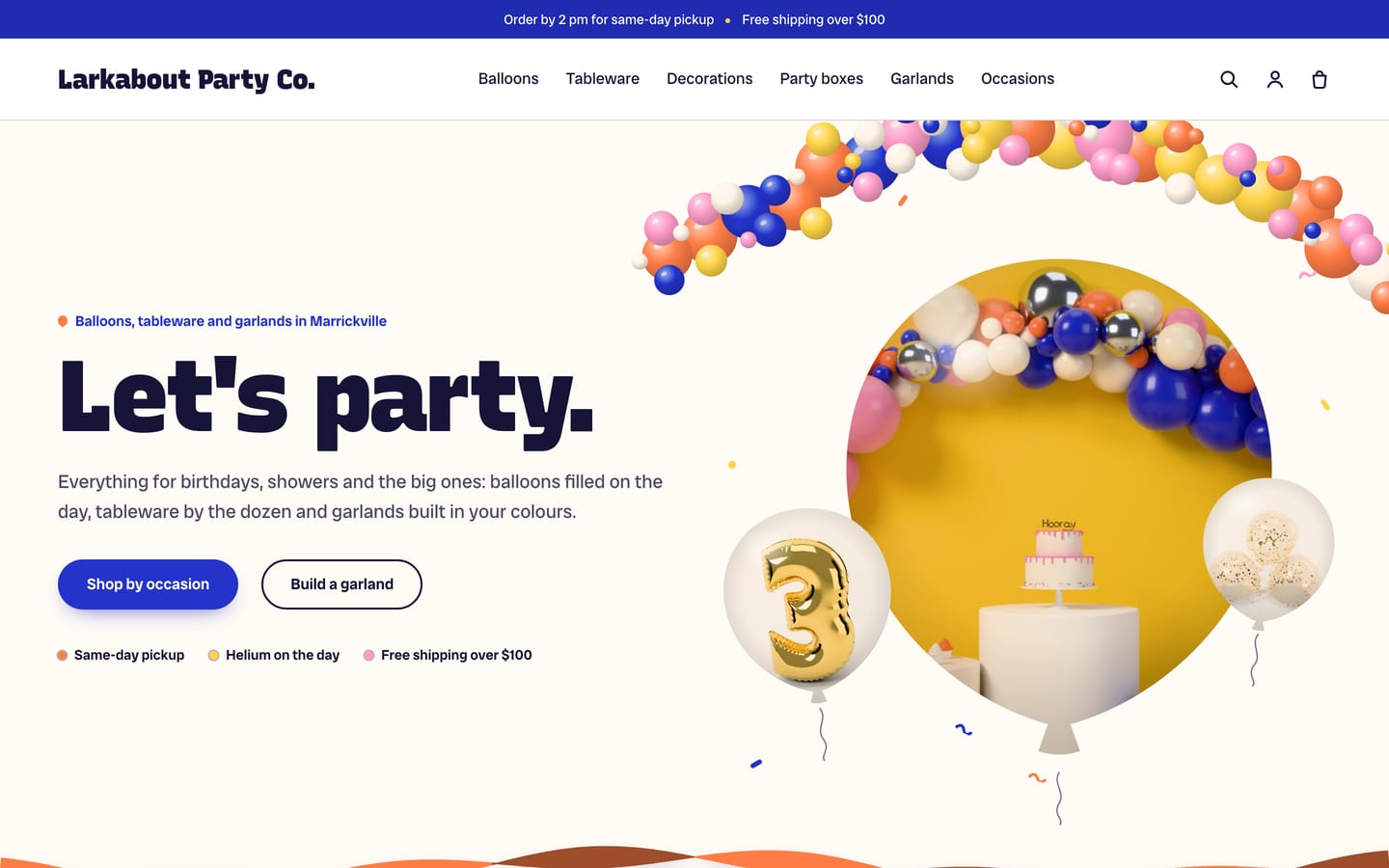
Hooray
For party supply shops, with a balloon hero (“Let’s party.”), shop by occasion, the Turning… picker, a featured collection, party in a box, the garland builder, the installation enquiry, testimonials and a newsletter.
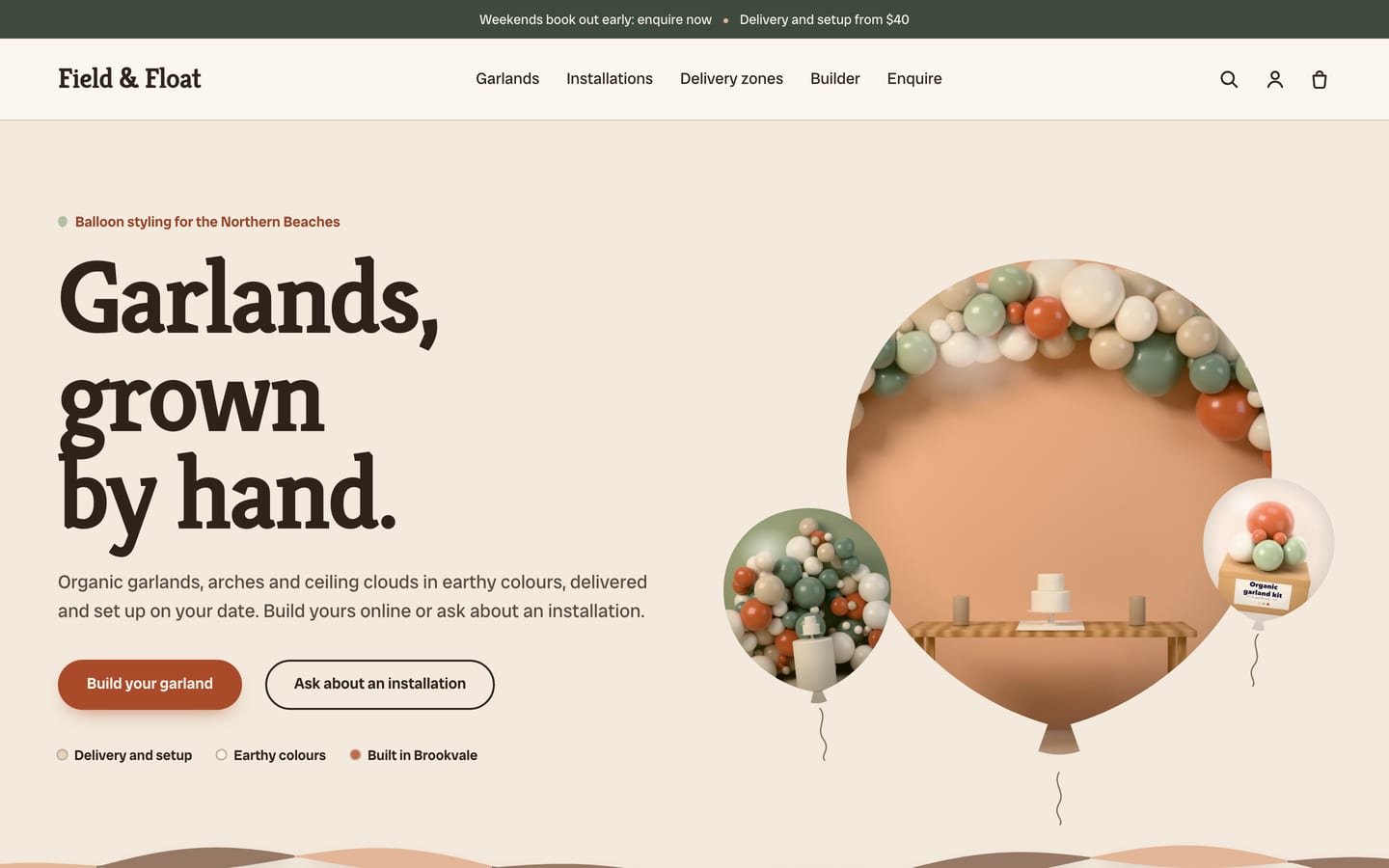
Garland
For balloon artists and event decorators, with a hero (“Garlands, grown by hand.”), the garland builder, recent setups as balloons on strings, the installation enquiry, your delivery zones table, testimonials and a newsletter. Check out waits for a date and zone.
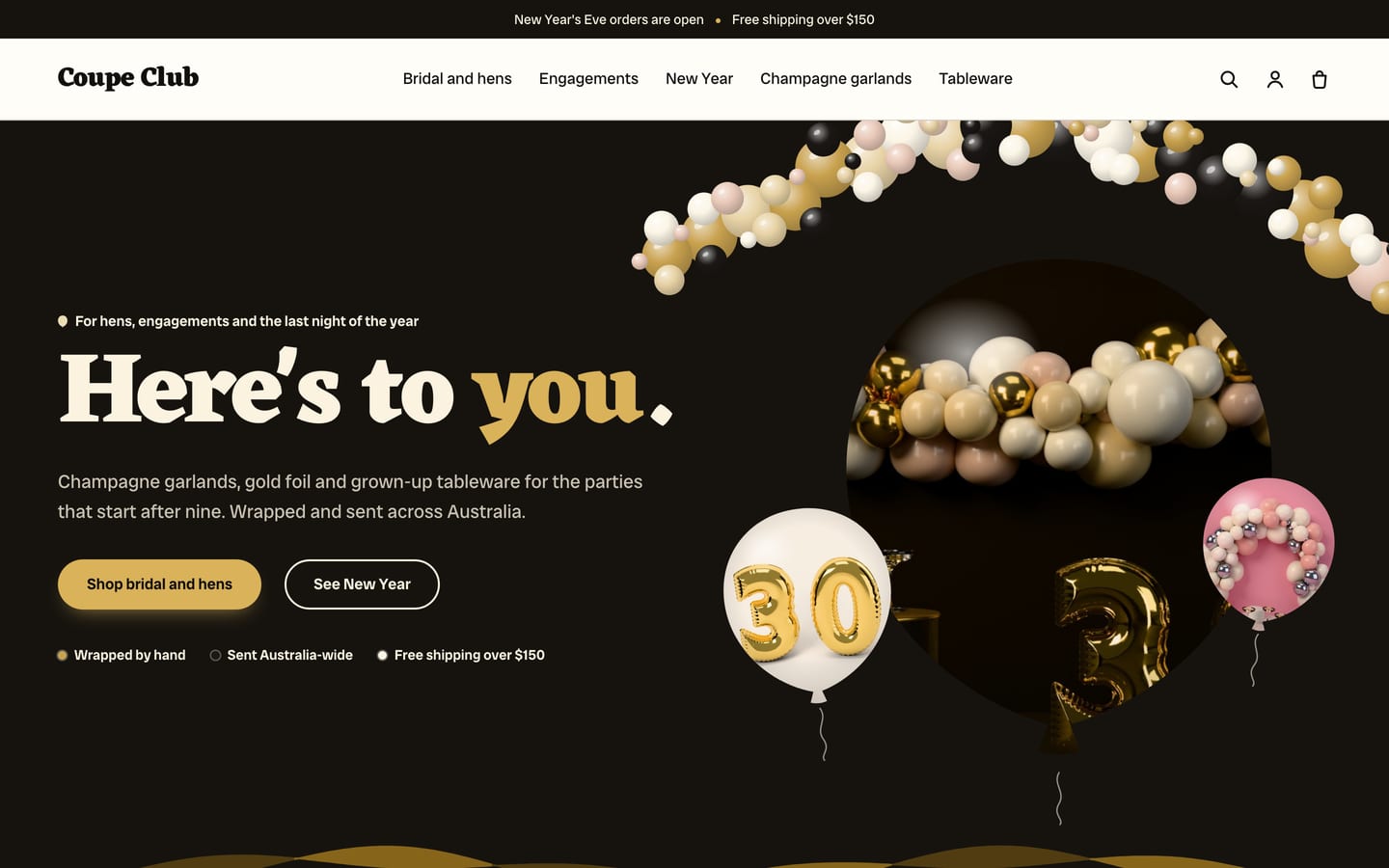
Toast
For grown‑up celebrations such as hens, engagements and New Year, with a hero on a black band (“Here’s to you.”), milestone ages in gold foil, occasions as cards, a featured collection, the garland builder, party in a box, testimonials and a newsletter.
The occasion, the age, the date and the guest count.
All four are built in, with no paid apps. They read five product metafields you create once in Shopify’s settings, a Length option on garland kits, and your settings in the theme editor. Some steps stay yours: occasion and age links filter once you add the Occasion and Number filters in Shopify’s free Search & Discovery app, the home page’s garland builder shows once you choose your garland kit, and party in a box once its party themes have products with a pack size.
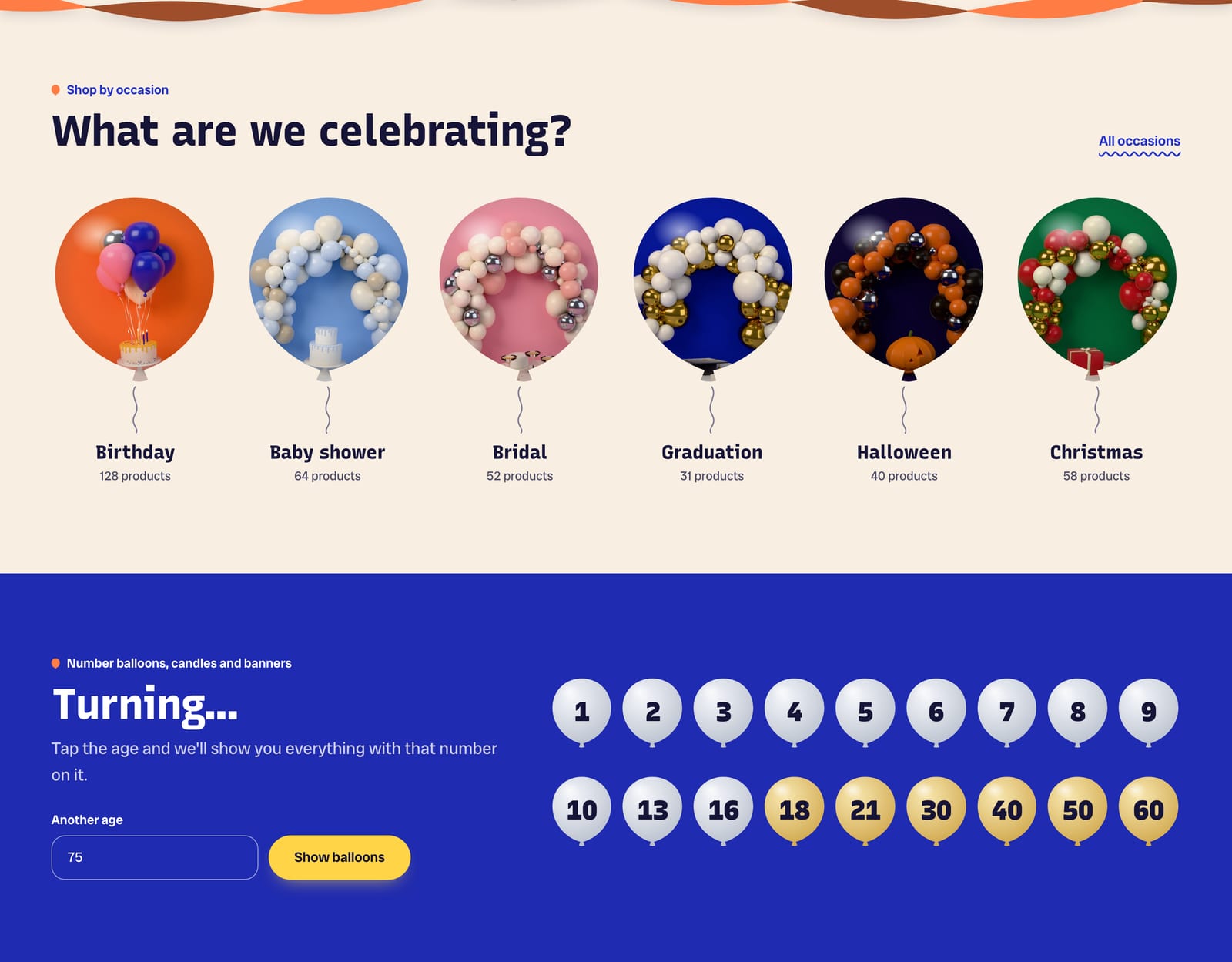
Shop by occasion and Turning…
A row of up to 12 occasion balloons on strings, each your picture cut as a balloon (or a plain color), links to its own collection or to an Occasion filter. On phones it becomes a sideways row to swipe. Occasion chips show each product’s occasions on cards and on the product page, where they link to everything else for that occasion. The Turning… picker shows foil number balloons for the ages you choose, milestone ages in gold, and a field for any other age. Each age opens your number balloon collection filtered by that number, the collection itself, or search results.
Garland builder
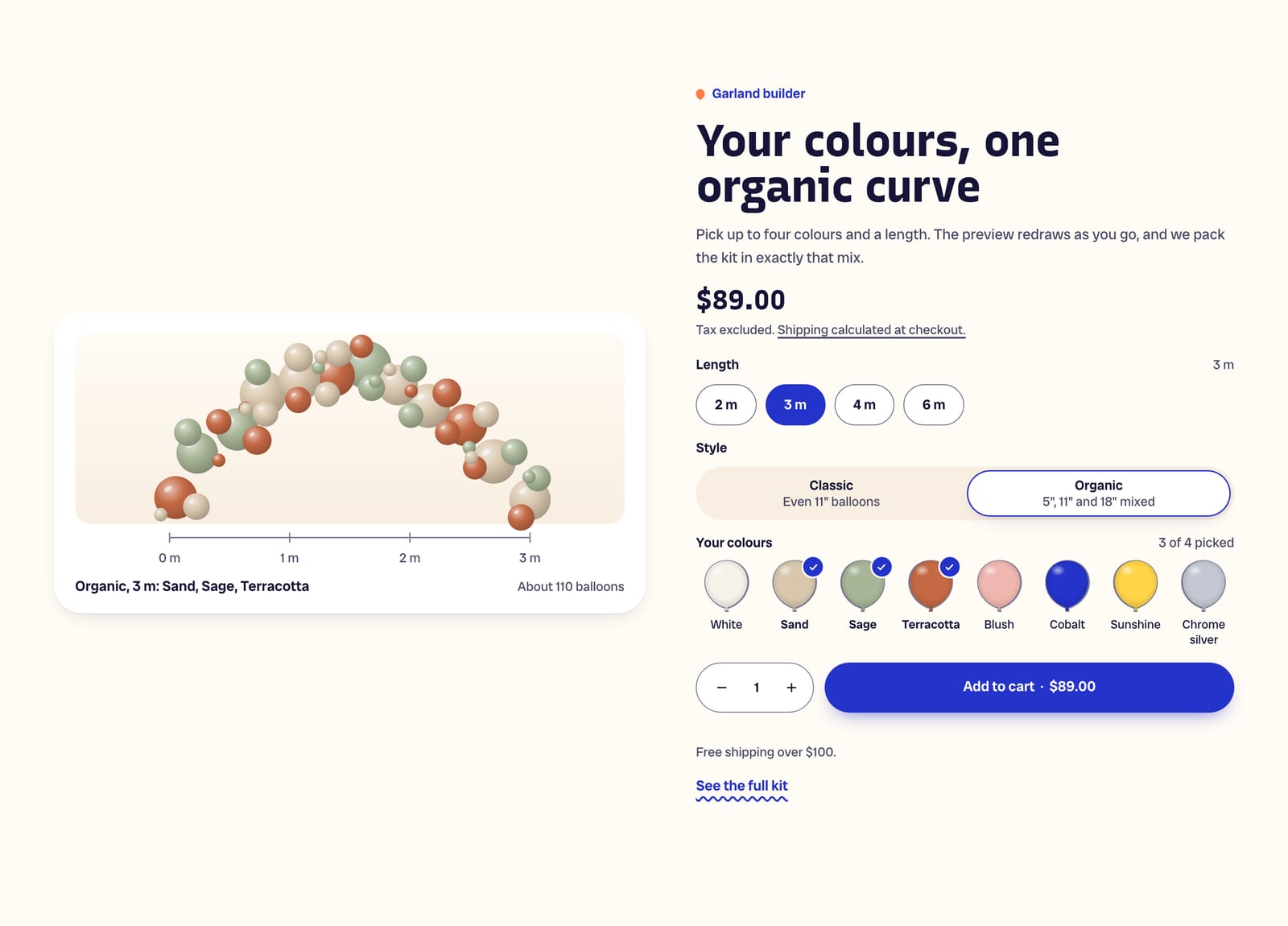
On the product page, shoppers pick up to four colors (you choose 1 to 6) from swatches you name and color, choose Classic or Organic, and pick the length from your own variants. The preview draws an organic garland in three balloon sizes over a meter ruler, with an approximate balloon count, and redraws as they choose. The colors and style go on the order with the cart line. Buy it now stays hidden until a color is picked, and quick add opens quick view, so a garland can’t reach the cart without its colors. It works on the home page too, as a featured product.
Event date and delivery zone
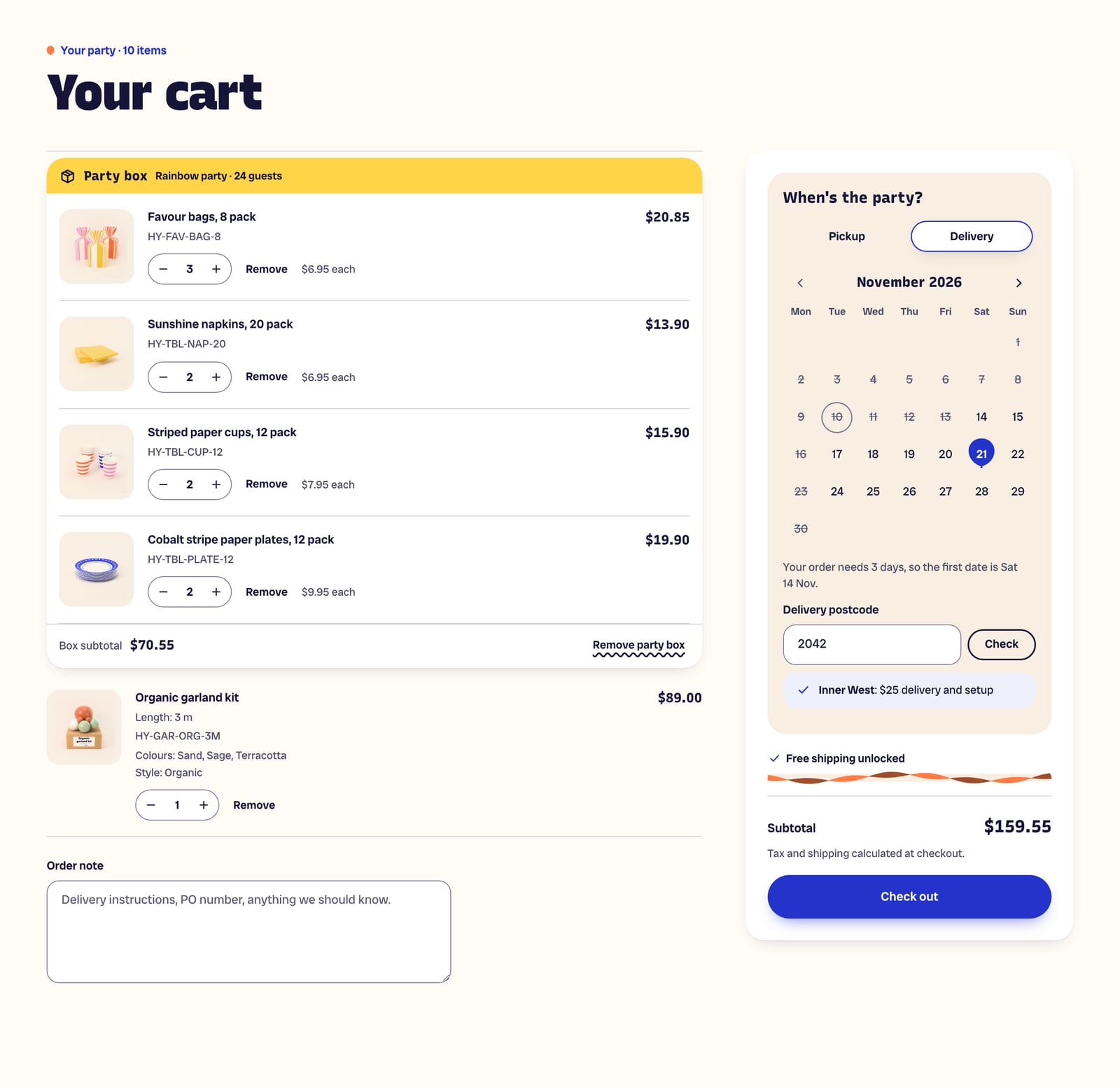
A panel in the cart drawer and on the cart page. Shoppers choose pickup or delivery, pick the event date on a calendar that knows your lead times (one for the store, or per product), daily cutoff, closed days and dates and your time zone, choose a time slot if you offer them, and check their postcode against delivery zones you type in: a name, postcodes or ranges, and fee text. Their choices are saved on the order: Event date, Fulfilment, Delivery postcode, Delivery zone and Time slot. You can hold the cart’s Check out button until a date and zone are chosen. Fees in the zones are text only, so set the same zones and prices in Shopify’s Local delivery, and Shopify’s checkout has no delivery date, so check the date on each order.
Party in a box
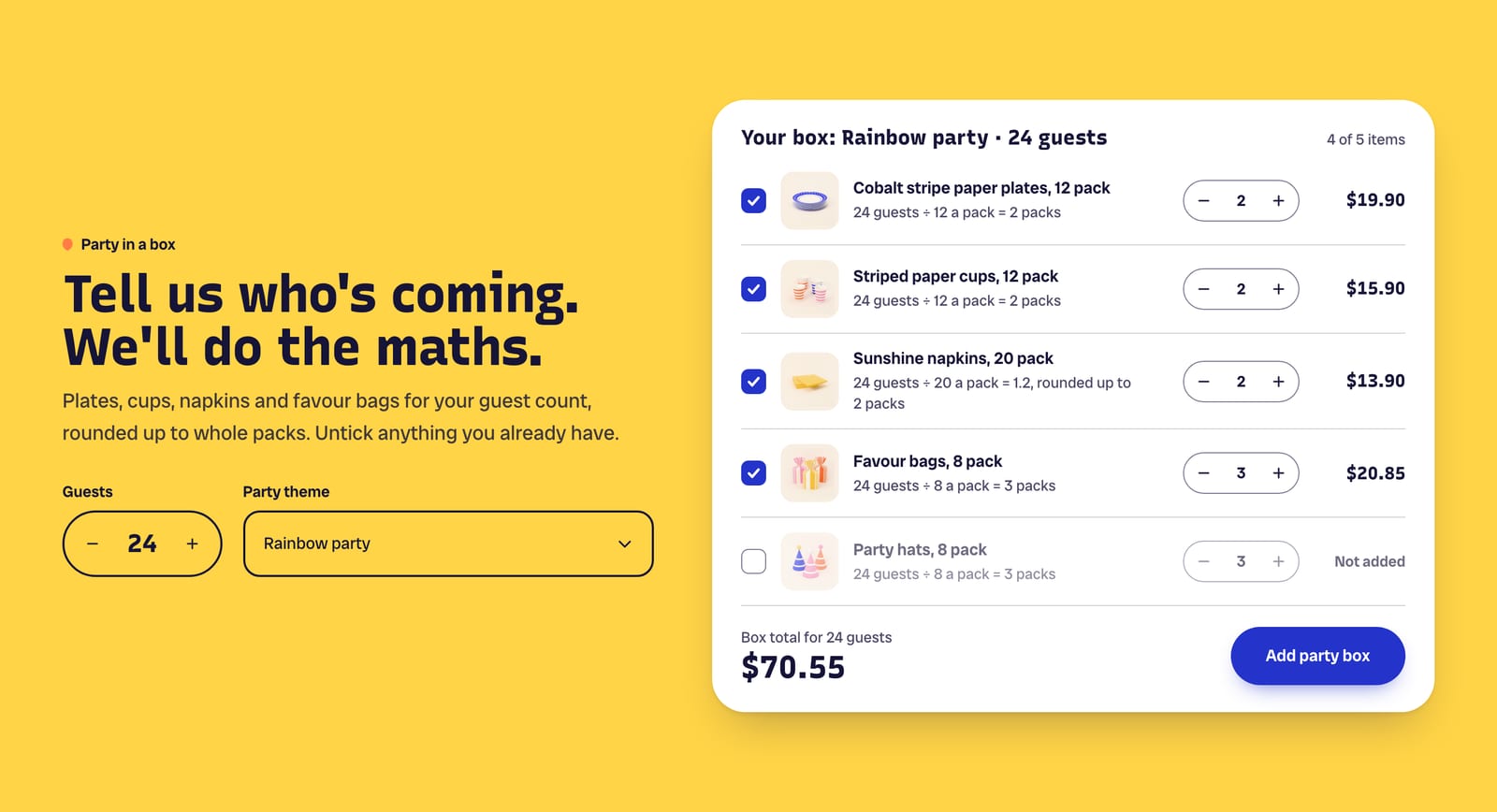
Shoppers set the guest count and pick a party theme (one of your collections), and the section lists the per‑guest products with the packs each needs, rounded up from each product’s pack size (“24 guests ÷ 20 a pack = 1.2, rounded up to 2 packs”). They untick what they already have, change a line if they like, and add the whole box in one tap. In the cart the box stays together as one card, with its subtotal and Remove party box. Each line is an ordinary product line, so stock, prices and discounts work as usual. The theme doesn’t discount a box: for a box price, create an automatic discount in Shopify.
What’s in the theme.
Everything below ships in version 1.0.0, and the documentation covers every section and setting.
Pages and sections
- An announcement bar with up to four announcements taking turns, and an optional countdown to a real deadline
- A one‑row header with a text logo or your own, a mega menu with promos, search with live suggestions and three sticky options; a long shop name takes two lines
- Hero: balloons, an image with a card, or a color block
- Slideshow, shop by occasion, Turning… picker, featured collection, featured product, collections as balloons on strings or cards, party in a box, installation enquiry, bundles, shop the table with hotspots, image with text, icon row, rich text, testimonials, logos, blog posts, newsletter, FAQ and more
- An installation enquiry form for arches, balloon walls and ceiling clouds, asking for the event date, the venue’s suburb, a budget range you set and colors, sent by Shopify to your store’s email
- Page templates for installation enquiries, a delivery zones page, a contact page with an order number field, and side‑by‑side product comparison
- Curling paper streamers to join sections, and a balloon garland in your palette’s colors
Product page
- Two product templates: one for most products, and one for garland kits with the garland builder under the options
- A gallery with zoom, video and 3D models
- A sticky add‑to‑cart bar, a kit contents table, a delivery note and a trust row
- Occasion chips that link to everything else for that occasion
- Pickup availability and back‑in‑stock requests that reach you by email
- Pre‑orders, gift card recipients, and subscriptions with a subscriptions app
- Shopify’s installments message, on stores with Shop Pay Installments
Collections and search
- Product cards with occasion chips and a note line
- One badge per card: Sold out, Sale, Pre‑order, Only 3 left or New
- A second image on hover, quick add, quick view, swatches and side‑by‑side compare of up to three
- Filters in a sidebar, or a drawer on phones, updating without reloading the page
- Search with live suggestions: products, collections, pages and articles
Cart
- Cart drawer and cart page with a free shipping bar and an order note
- Party boxes grouped as one card, with their subtotal
- The event date and delivery zone panel
- Buy it now and the express buttons hidden by default, so shoppers go through the cart
Trade and B2B
- Quantity rules, volume pricing and a quick order list for wholesale customers on Shopify’s B2B features
Accessibility and languages
- Every text and control color measured against WCAG AA contrast in every palette
- Keyboard friendly
- Motion: balloons bob on hover, the hero garland sways twice and stops, and confetti pops once when a party box or garland goes in the cart, all switched off for shoppers who prefer reduced motion
- Right‑to‑left languages
At a glance.
- Version
- 1.0.0, an instant download from Etsy
- In the download
- Three theme files, one per preset (Hooray, Garland and Toast), a user guide (PDF, 51 pages) and a license for one store
- Built on
- Online Store 2.0
- Color palettes
- Four in one theme: Confetti, Sand, Gilt and Disco (three light, one dark)
- Fonts
- Recursive, Kreon or Eczar for headings, depending on the preset, and Radio Canada Big for body text in all three. Font pickers for headings and body text, heading and text sizes, three page widths, section spacing and a back‑to‑top button.
- You’ll need
- A Shopify store on any plan that can publish a theme, and a computer to upload it (phones can’t upload theme files). Collection filters, the Occasion and Number filters behind occasion and age links, and complementary product recommendations need Shopify’s free Search & Discovery app. Delivery and pickup at checkout need Shopify’s own Local delivery and Pickup in store, set up to match the theme’s zones (the user guide shows how). The installments message under the price needs Shop Pay Installments switched on, where Shopify offers it. Subscriptions need a subscriptions app, and star ratings a reviews app. Other languages need Shopify’s free Translate & Adapt app, and wholesale customers need Shopify B2B, on plans that include it.
- Your data
- Occasions, ages, party boxes and lead times read five product metafields you create once in Shopify’s settings, with no app: custom.occasions (a list of text), custom.number, custom.pack_size, custom.lead_days (whole numbers) and custom.card_note. The user guide gives every exact key and type, step by step. Garland lengths come from a Length option on the product. Delivery fees in the zones are text only: the theme doesn’t add a fee or change what checkout charges. Shopify’s checkout has no delivery date, so the date is saved with the order, and a saved checkout link can still skip the cart, so check each order. Installation enquiries and back‑in‑stock requests arrive at your store’s email; the theme doesn’t email shoppers or send newsletters. The presets’ words are demo text, including claims about delivery, pickup, helium, returns, free shipping and sample testimonials, so use real reviews and only promise what your store actually offers.
- Support
- Message us on Etsy or email hello@buglyph.com. We reply within two business days, Monday to Friday, Australian Eastern Time.
Documentation and support.
Documentation
Installing the theme, every section and setting, and setting up Hooray’s data, chapter by chapter. The same guide comes as a PDF in the download.
Support
Questions, bugs and setup help. Message us on Etsy or email us. We reply within two business days, Monday to Friday, Australian Eastern Time.
Hooray
Sold on Etsy as an instant download. Each purchase licenses one Shopify store.