Peel
A theme for sticker artists and sticker shops, washi tape, pen and planner‑accessory sellers, kawaii stationery brands, and enamel‑pin and patch makers. Its four tools answer what a shopper arriving from TikTok on a phone wants to know: what the holo looks like, how big 3 inches really is, how it looks on a laptop and how much more to spend for the free one. It looks like a sticker‑covered laptop lid: big flat fields of color with rounded corners and a thick black outline, set into a plain page, and on them stickers with a black keyline, a white die‑cut border, a soft shadow, a small fixed tilt and a corner just starting to lift. The hero headline is a sticker, and so are the badges and the wordmark.
One theme, four color palettes.
Pick one in Theme settings › Colors. Change any single color to make an exception.
Switch at any time
The palettes are one setting, not separate installs. Three are light and one is dark, and you can override fifteen of their colors one at a time. Ruled paper is a setting of its own, so it works with any palette.
Checked for contrast
Every text and control color in the four palettes is measured against WCAG AA contrast on every ground it can sit on, the lids and the darkest band included. A color you set yourself is yours to check.
A sticker stays a sticker
The white die‑cut border and the black keyline stay the same on every ground, so a sticker looks like the same sticker wherever it lands. Text, buttons and focus rings change with the ground on their own.
Three presets, one theme.
Each preset is a complete starting store, with its own home page, palette and fonts. Every section, block and setting is in all three.
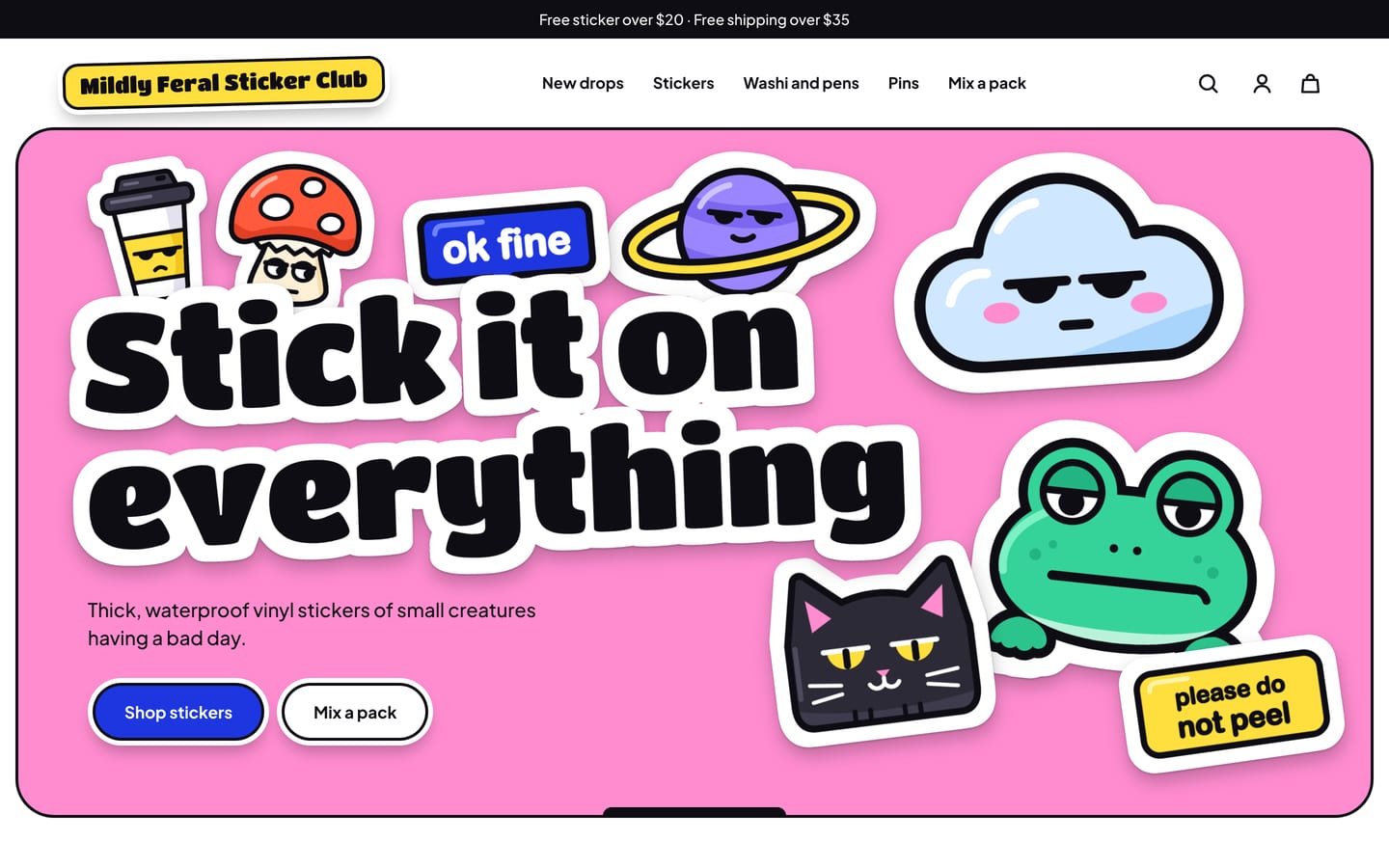
Peel
For sticker artists and sticker shops, with a lid hero (“Stick it on everything”), Mix‑and‑match packs, new drops, Shop by finish (Matte, Glossy, Holo and Clear), the See it on spotlight, best sellers, a reviews wall and the newsletter.
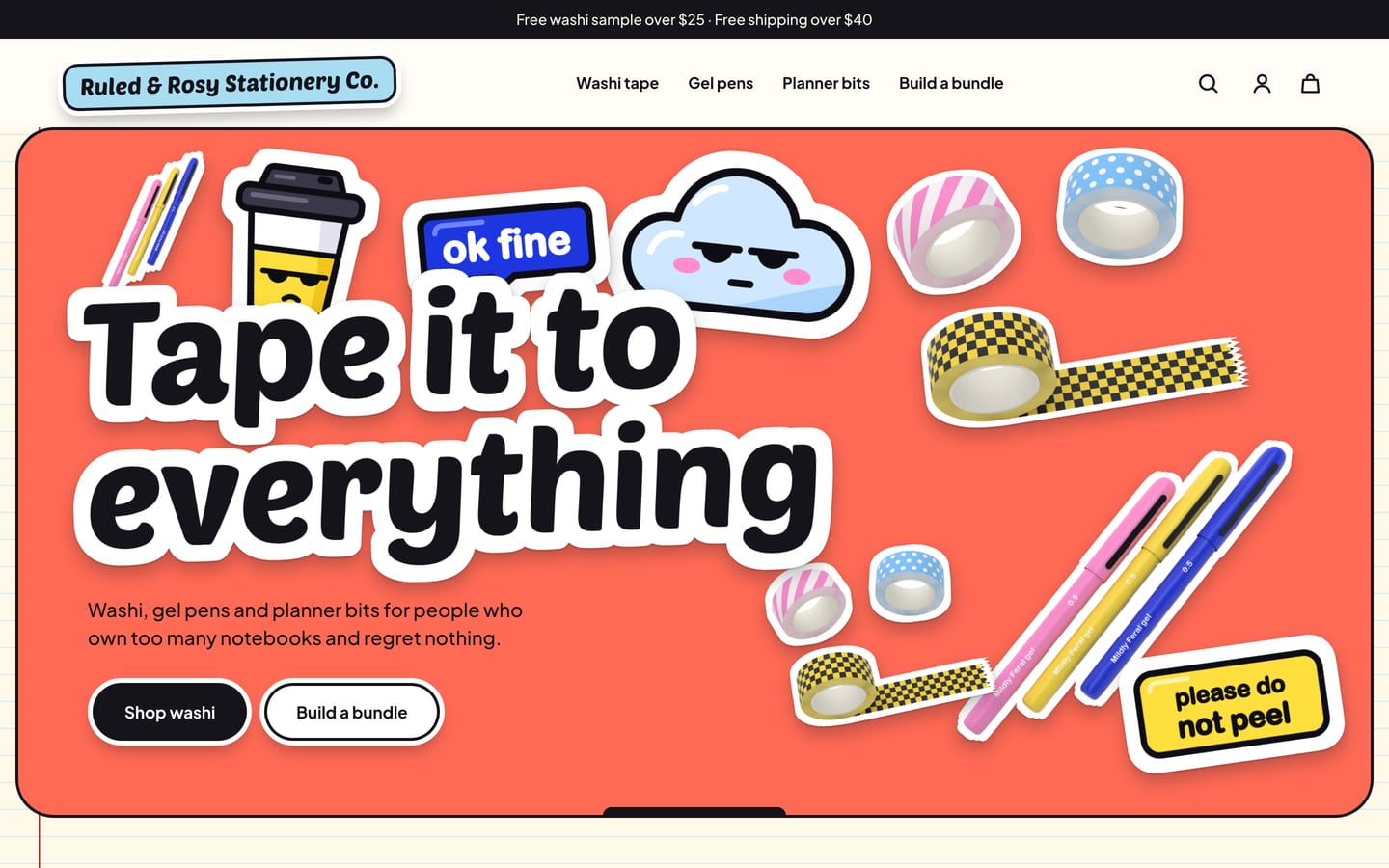
Washi
For washi tape, pens and planner accessories, on a ruled paper page, with a lid hero (“Tape it to everything”), what’s new on the shelf, Mix‑and‑match packs as a bundle of 5 or 10, a collections grid (Washi tape, Gel pens and Planner bits), the See it on spotlight, “The ones that keep running out”, a reviews wall and the newsletter.
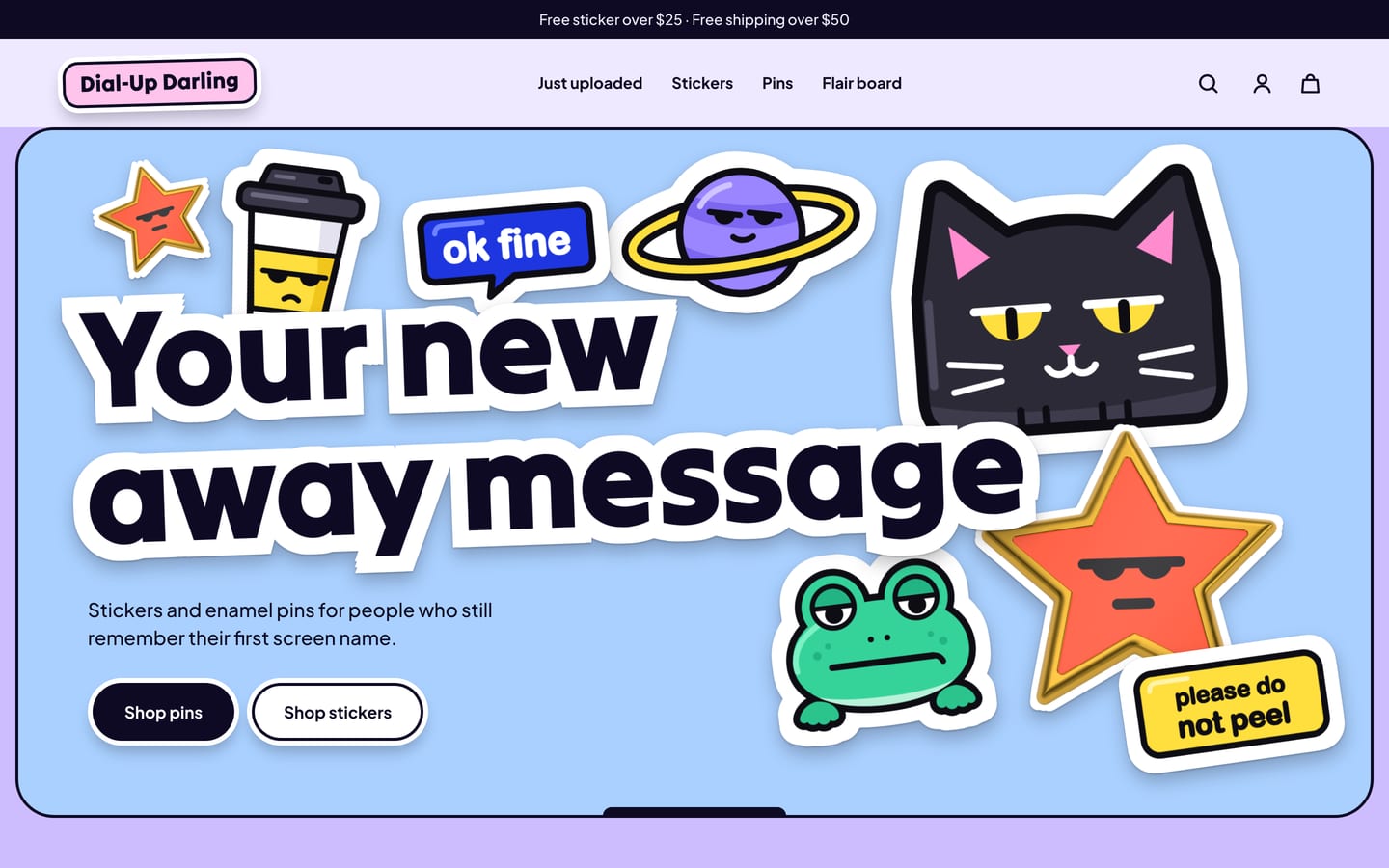
Retro
For enamel pins, patches and stickers, with a lid hero (“Your new away message”), what’s just uploaded, Shop by finish (Holo, Glitter, Glossy and Clear), Mix‑and‑match packs as a flair board, the See it on spotlight, “Most forwarded”, a reviews wall and the newsletter.
The finish, the pack, the free one and where it sticks.
All four are built in, with no app, and they run on your ordinary product options, a product tag and your settings in the theme editor. Some steps stay yours: the free gift needs a Shopify discount you create once, the finish chips above your collections need a filter in Shopify’s free Search & Discovery app, and See it on needs your own scene photos. A product without the extra data still sells.
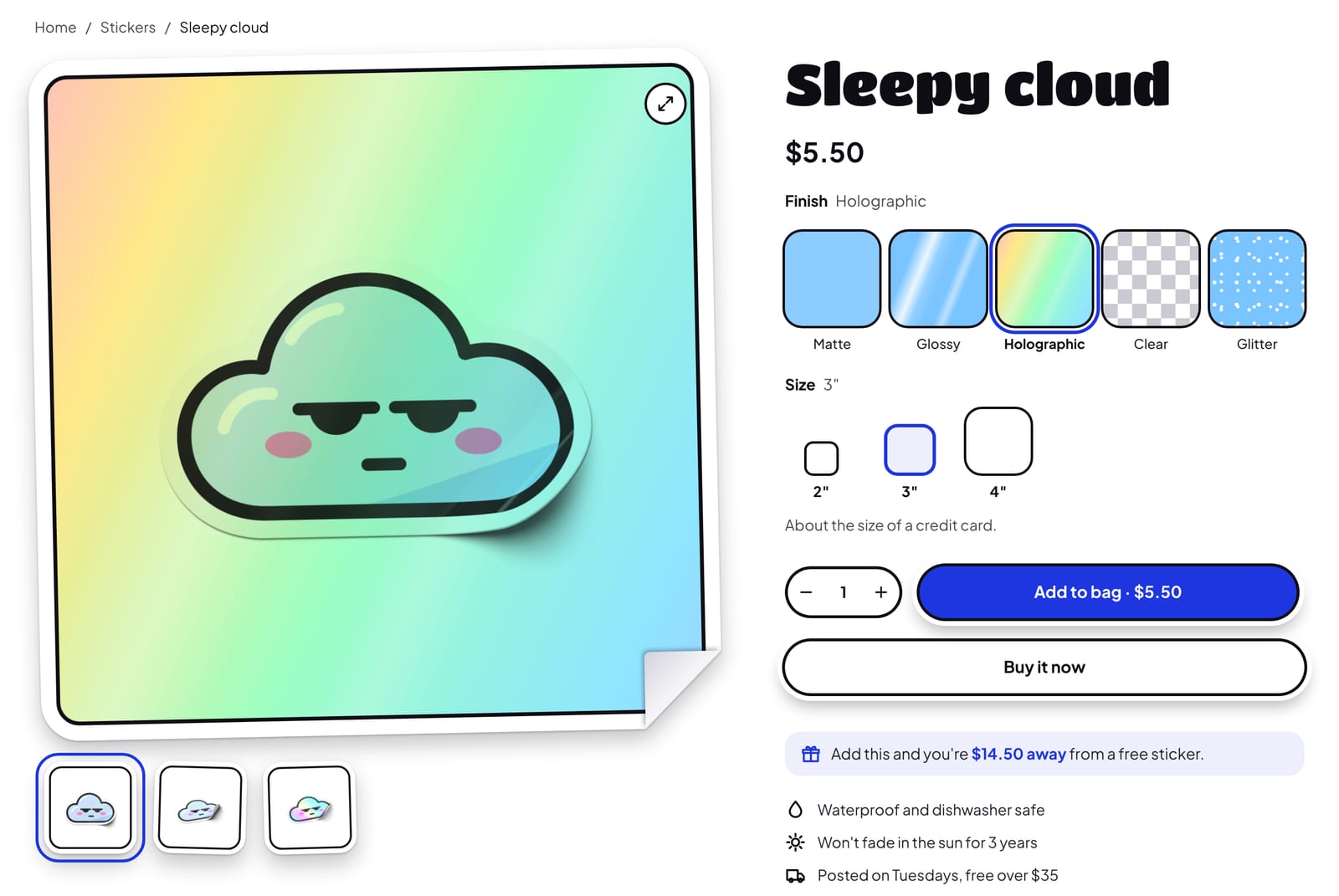
Finish and size picker
A sticker’s finish and size are what shoppers can’t judge from a photo, so Peel shows them. Each finish gets a swatch, and choosing one plays it over the product image: a holographic rainbow that shimmers for about 5 seconds, twinkling glitter, a sweep of gloss, a flat matte film, or a checkerboard where clear has nothing behind the art. On phones, where the gallery has usually scrolled away, a small preview beside the finish heading shows the same sheen. Sizes are drawn as chips to scale, so a 2 inch chip is half the size of a 4 inch one, with a line such as “About the size of a credit card.” under them. It all reads your ordinary Finish and Size options, so each combination is a normal variant with its own price and stock, and nothing extra goes on the order. The sheen is a drawing laid over your image, not a photo of your product, and holo works best on light art. The finish chips above your collections are separate: they’re Shopify’s Finish filter, and they appear only once you’ve added that filter in the free Search & Discovery app.
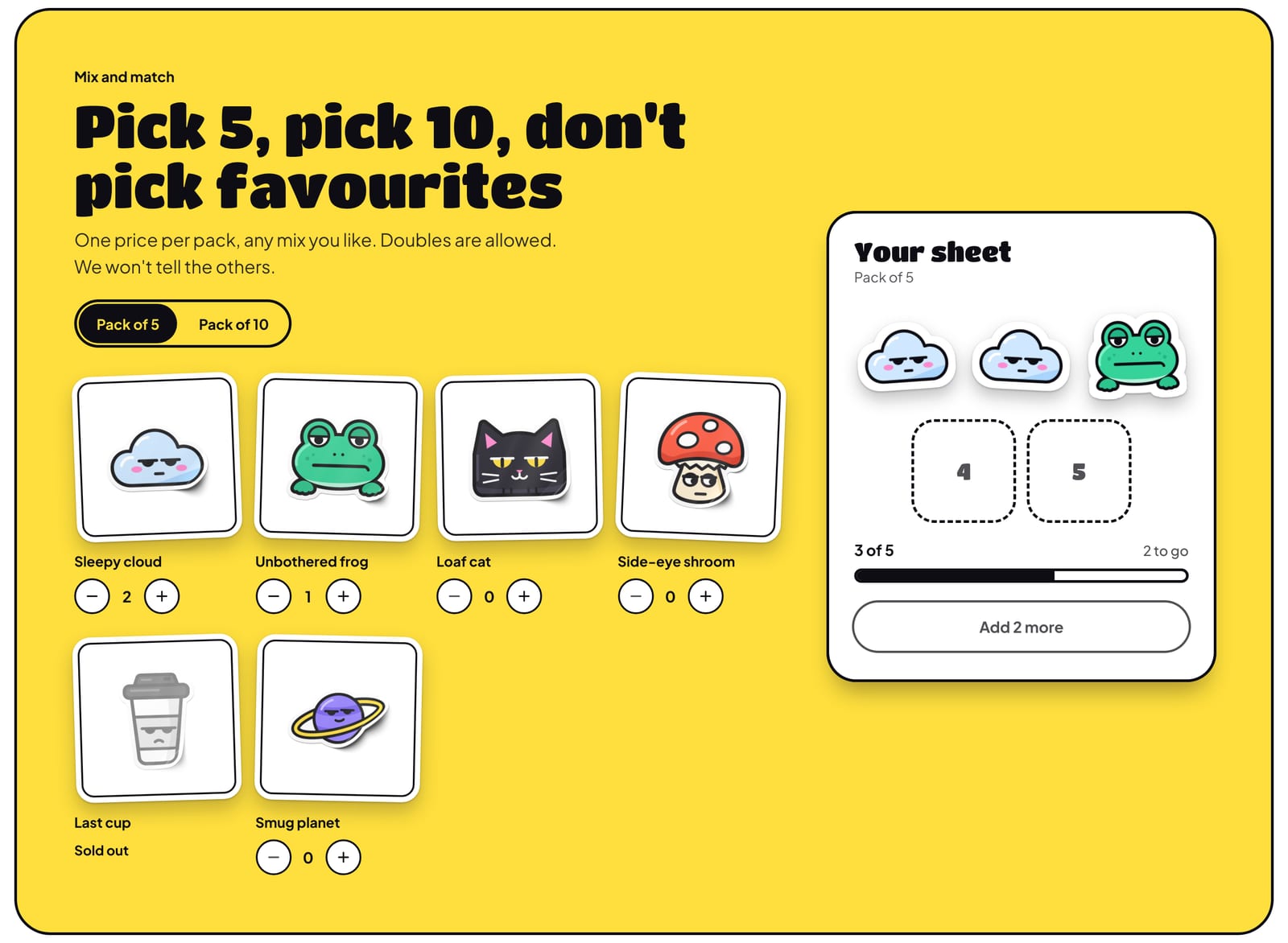
Mix‑and‑match packs
Shoppers fill a blank sticker sheet and watch it fill: each sticker they add slaps into the next numbered slot at its own small tilt, with “3 of 5”, “2 to go” and a progress bar under it. The button reads “Add 2 more” until the sheet is exactly full, then “Add pack to bag · $18.00”. On phones the sheet docks at the bottom of the section as shoppers scroll. The price is on the pack’s variants, so no discount app is needed, and the pack arrives as one line with its stickers written out, such as “2× Sleepy cloud · 1× Unbothered frog”. Doubles are fine, sold‑out stickers stay listed but can’t be picked, and switching to a smaller pack keeps every choice until the shopper takes some out. Pack sizes come from your variants, so you aren’t limited to 5 and 10. You create the pack product, tag it mix-pack, give it the pack template and choose a collection of stickers. Stock is counted on the pack, so a sale doesn’t touch the stickers’ own stock: mark a sticker sold out yourself when you run out.
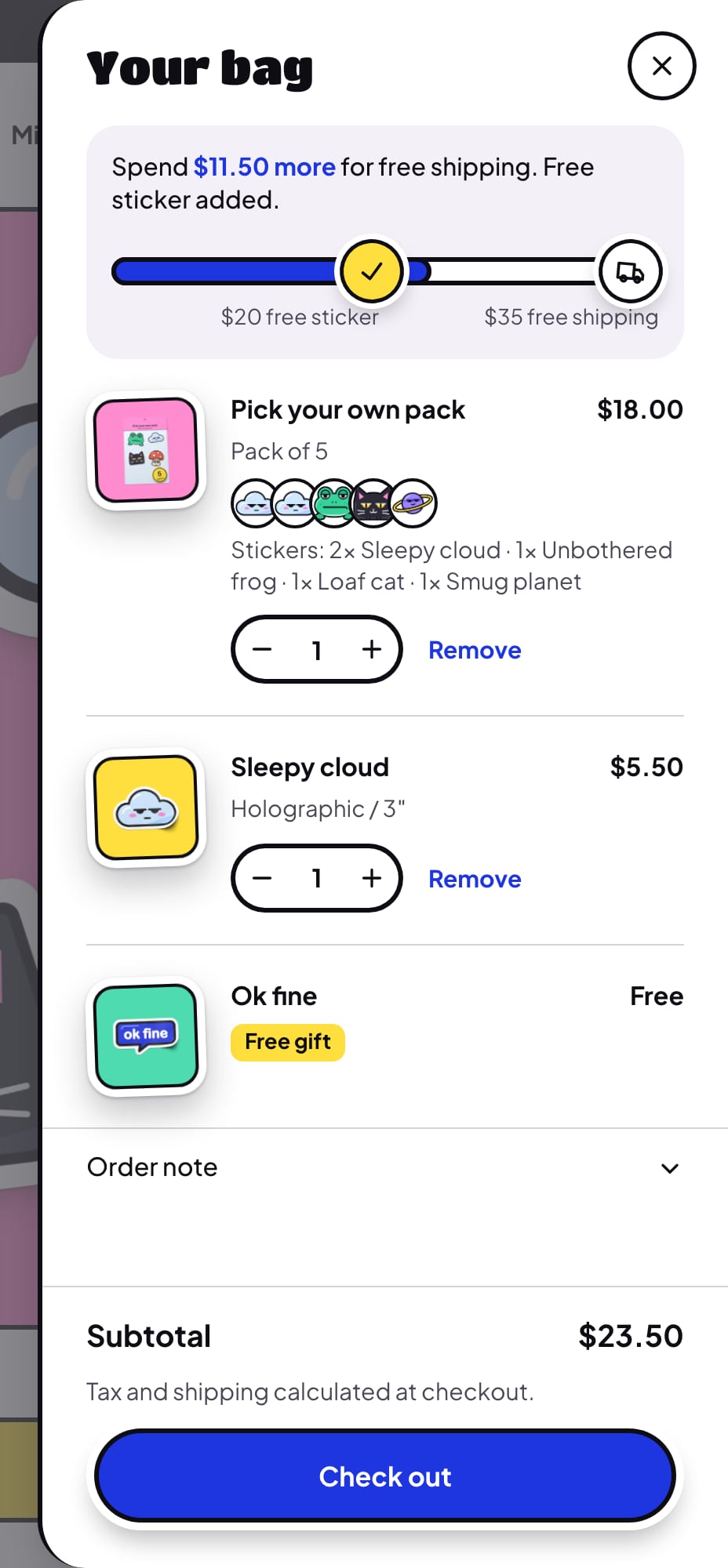
Free‑gift progress
A sentence and a chunky bar at the top of the bag drawer and the cart page count up to a reward: “Spend $10 more for a free sticker.” When the bag reaches the amount, the marker flips to a tick, the gift goes in the bag by itself as a line tagged Free gift, and the sentence moves on. If the bag drops below the amount, the gift leaves again. You can set two rewards, your free shipping amount can join the bar as the last step, and a nudge under the add button says how close a product takes the shopper. The theme adds and removes the gift, but it can’t make it free: that takes a Buy X get Y automatic discount you create once in Shopify, and the guide walks you through it. Until you do, the gift line carries its real price and the shopper pays it. The bar is on in all three presets with no gift chosen, so set up your gift or turn the bar off before you publish. It shows only to shoppers paying in your store’s currency, and Buy it now and the express checkout buttons skip the bag, so those orders get no gift. The free shipping amount only changes the theme’s messages: the rate itself is set in Shopify.
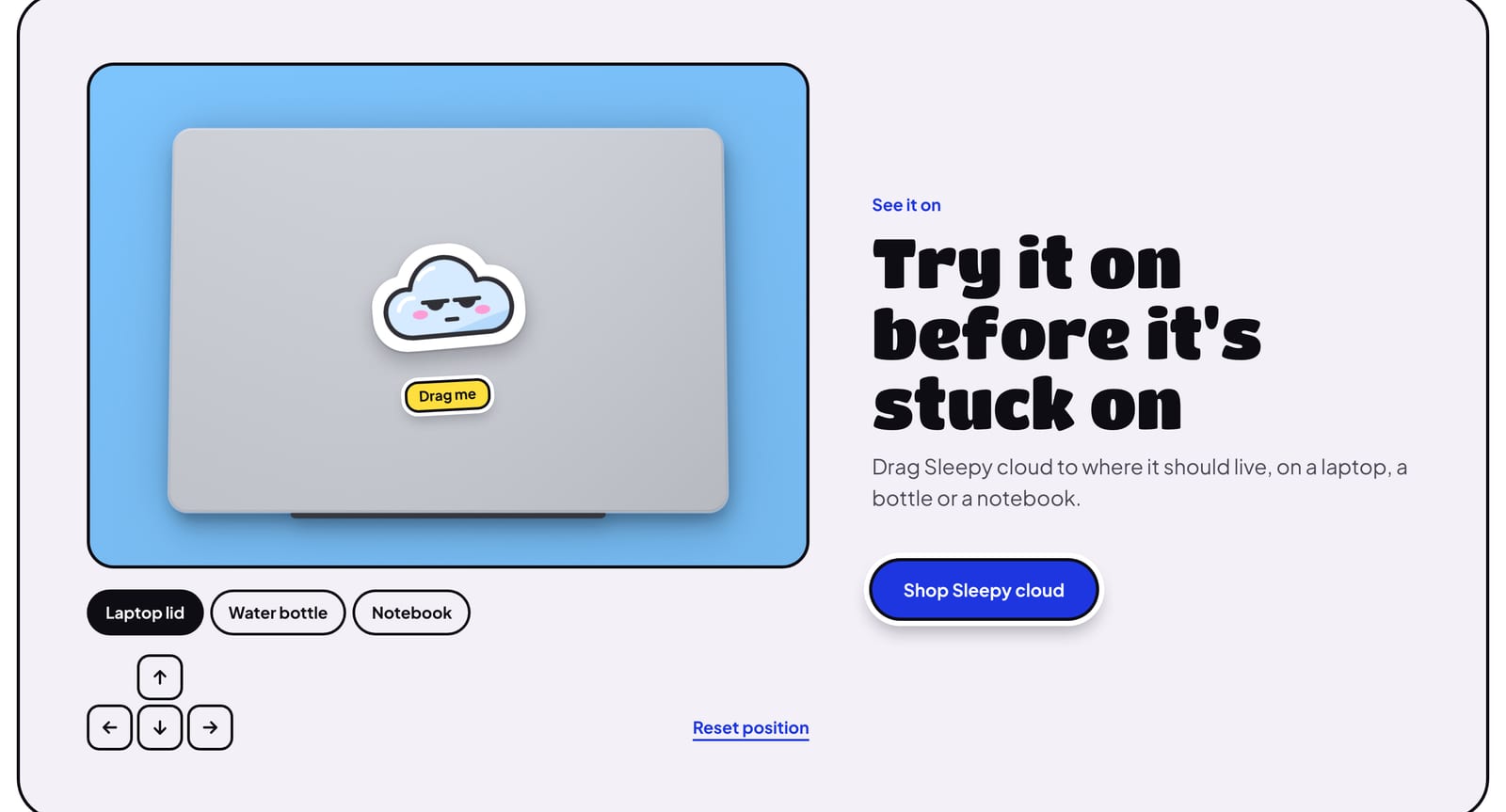
See it on
On the product page, shoppers drag their sticker around a laptop, a bottle or a notebook, at the size and in the finish they picked: pick a bigger size and it grows, pick another finish and the sheen changes, cut to the art’s shape. A spotlight section puts one sticker on the home page, at the size you set. Dragging works with a mouse or a finger, and a four‑way pad, Reset position and the arrow keys do the same job. The scenes are your own photos, up to five, so until a scene has an image, shoppers see nothing here. Add a transparent PNG to one metafield and the white border follows the art’s outline; without it the sticker is the product’s featured image as a small square die‑cut. It’s a preview only: nothing about it goes near the bag or the order.
What’s in the theme.
Everything below ships in version 1.0.0, and the documentation covers every section and setting.
Pages and sections
- An announcement bar on the darkest band, with messages taking turns, a link and an optional countdown to a real deadline
- A one‑row header with the wordmark as a sticker, a mega menu with small die‑cut promos and search with suggestions as shoppers type; a long shop name takes two lines before anything else gives way
- Hero: a big outlined lid with the headline as a sticker and up to eight stickers you place (six on phones), or a banner with one photo
- Slideshow, Mix‑and‑match packs, Shop by finish, See it on spotlight, featured collection, featured product, collections grid, image with text, bundles, Shop the desk with numbered hotspots, an icon row or numbered steps, Stocked at logos, a reviews wall, FAQ, newsletter, blog posts, rich text and custom Liquid
- Contact and compare page templates, a template for packs, a plainer template for goods the sticker claims don’t fit, a 404 page and a password page
Product page
- A gallery that stands as a big die‑cut with a peeled corner and thumbnail stickers, with zoom, video and 3D models
- Finish swatches and size chips, with swatches, pills or a menu for your other options
- Add to bag with the price in it, a sticky add‑to‑bag bar, pickup availability, and back‑in‑stock requests that reach you as a message
- Trust rows and a spec table for details such as thickness, from typed rows or your own metafields
- Pre‑orders for a run you’re taking orders for ahead of time, gift card recipients, and subscriptions with a subscriptions app
- Shopify’s installments message, on stores with Shop Pay Installments
- “Pairs well with” and “It gets lonely” recommendations
Collections and search
- Products stand as stickers with a fixed tilt and a peeled corner, on a colored tile or cut to the outline of a transparent PNG, with the name, a short line and the price underneath
- A round + on the art that fits each product: it adds a single item, opens quick view when there are options and links to a pack’s page, plus optional quick view buttons, swatches and a second image on hover
- One badge per card: Sold out, Save, Only 3 left, New or Best seller
- Finish chips above the grid once you’ve added the Finish filter, and every other filter in a drawer, all updating without reloading the page
- Search with live suggestions: products, collections, pages and articles
- Compare up to three products side by side
Cart
- Bag drawer and cart page with the free‑gift bar, an order note and each line’s photo as a small die‑cut
- Pack lines with small round pictures of the chosen stickers and their names written out
- A gift line with no stepper or Remove, because the bag adds and takes it; it reads Free once your discount applies
- An empty bag: “Your bag is empty” and “Nothing stuck here yet.”
Trade and B2B
- Quantity rules, volume pricing and a quick order list for Shopify’s B2B features, for customers such as stockists buying wholesale
Accessibility and languages
- Every palette measured against WCAG AA contrast, the lids and the darkest band included
- Keyboard friendly: arrow keys move the sticker in See it on, and screen readers hear each step of a pack and the limit
- Each finish swatch has its name under it, so color is never the only cue
- Motion follows the visitor’s reduced motion setting: a finish still shows, standing still
- Right‑to‑left languages
At a glance.
- Version
- 1.0.0, an instant download from Etsy
- In the download
- Three theme files, one per preset (Peel, Washi and Retro), a user guide (PDF, 48 pages) and a license for one store
- Built on
- Online Store 2.0
- Color palettes
- Four in one theme: Bubblegum, Notebook, Y2K and Blacklight (three light, one dark), with an optional ruled paper page pattern
- Fonts
- Titan One and Plus Jakarta Sans, Poetsen One and Plus Jakarta Sans, or Tilt Warp and Plus Jakarta Sans, depending on the preset. Font pickers for headings and body text, a heading size, a base text size and three page widths.
- You’ll need
- A Shopify store on any plan that can publish a theme, and a computer to upload it (phones can’t upload theme files). The free gift needs an automatic Buy X get Y discount that you create once in Shopify: the theme adds the gift, and the discount makes it free. The finish chips and complementary product recommendations need Shopify’s free Search & Discovery app. The installments message under the price needs Shop Pay Installments switched on, where Shopify offers it. Subscriptions need a subscriptions app, and product ratings a reviews app. Set your real free shipping rate in Shopify: the theme’s amount only changes its messages.
- Your data
- Finishes, sizes and pack sizes read your ordinary product options. A transparent sticker PNG and a card note read product metafields that you set up once, with no app; a variant can have its own PNG, and the user guide walks you through each one. A product tag marks a pack, and two more add the New and Best seller badges. Rewards, amounts, the gift product, size hints and finish names are settings in the theme editor. See it on scenes are your own photos, and the presets’ hero stickers are sample art until you give them images. Stock is counted on the pack, not on the stickers in it. The theme doesn’t send email: the newsletter collects sign‑ups, and you write the emails. The presets’ sample words, such as the trust rows, the reviews and the newsletter’s offer, make claims about your shop, so rewrite or delete them.
- Support
- Message us on Etsy or email hello@buglyph.com. We reply within two business days, Monday to Friday, Australian Eastern Time.
Documentation and support.
Documentation
Installing the theme, every section and setting, and setting up Peel’s data, chapter by chapter. The same guide comes as a PDF in the download.
Support
Questions, bugs and setup help. Message us on Etsy or email us. We reply within two business days, Monday to Friday, Australian Eastern Time.
Peel
Sold on Etsy as an instant download. Each purchase licenses one Shopify store.